
Freddie Mac AIM Check integration
The Freddie Mac AIM Check integration lets you assess the likelihood of obtaining income Representation and Warranty (R&W) relief on wage earner borrowers directly from the documents Ocrolus has already processed. Ocrolus takes the pay stubs and W-2s you've uploaded, transforms the extracted income into Freddie Mac's MISMO-format AIM Check for Payroll Income request, submits it to Freddie Mac, and returns the assessment, eligibility, and certificate. This helps you reduce manual entry effort and helps you lower repurchase risk.
NoteBefore using this integration, complete the one-time setup described in the Freddie Mac AIM Check setup guide. The Freddie Mac AIM Check service is available to users accessing the Ocrolus Dashboard from within the United States.
Key capabilities
Reuses income data already extracted from your uploaded pay stubs and W-2s.
On the Wage earner tab, selecting Freddie Mac as the loan program runs the
calculation, there is no separate button to press.
Returns Freddie Mac's income assessment and per-income-type eligibility determination.
A radio button lets you switch to Ocrolus's own income calculation at any time, and a refresh button re-runs the Freddie Mac calculation.
Downloads the Freddie Mac certificate PDF directly from the Dashboard.
Imports the certificate and Freddie-derived income into your Encompass loan.
Integration flow
- Documents reach Ocrolus: Pay stubs and W-2s arrive via your Encompass integration or direct upload in the Dashboard. Ocrolus classifies and extracts the income as usual.
- AIM Check runs automatically: When Freddie Mac is selected as the loan program on the wage earner tab, Ocrolus runs the AIM Check. If Freddie Mac isn't already selected, choose it from the loan program drop-down.
- Encompass sets the default: When your Book is connected to Encompass, Ocrolus reads certain loan fields to determine whether the loan defaults to Freddie Mac.
- Ocrolus submits to Freddie Mac: Ocrolus transforms the extracted data into a MISMO AIM Check request and submits it securely.
- Results appear inline: Freddie Mac returns the assessment result, per-income-type eligibility, and a certificate, displayed inline on the Wage earner tab.
Prerequisites
Before you can run an AIM Check, complete the one-time setup described in the Freddie Mac AIM Check setup guide:
- You must be a Freddie Mac–approved Seller/Servicer with a valid Seller/Servicer number.
- Register Ocrolus as your service provider using the Freddie Mac Tools Request Form. Select AIM API Relationship and designate Ocrolus.
- Provide your Seller number to Ocrolus. Ocrolus configures it on your organization and enables Freddie Mac as a loan program on the Wage earner tab.
Running the AIM Check
Use the following steps to run the Freddie Mac income calculation, review the results, import the certificate into Encompass, and resubmit the loan to LPA:
Step 1: Get documents into the Book
Upload the borrower's pay stubs and W-2s to the Book, either through your Encompass integration or directly in the Dashboard. Ocrolus classifies and extracts them as usual, the same way as the Fannie Mae income calculator. At minimum, provide the borrower's most recent pay stub and their W-2 from last year. If the borrower has a W-2 from the year before that, provide it too. Freddie Mac reviews two years of income.
Step 2: Select Freddie Mac on the Wage earner tab
Open the borrower's Wage earner tab in Analyze for Mortgage. If Freddie Mac isn't already selected, choose it from the loan program drop-down. When it's selected, Ocrolus runs the AIM Check automatically. There is no separate button to press. If your Book is connected to Encompass, the default is derived from your Encompass loan data.
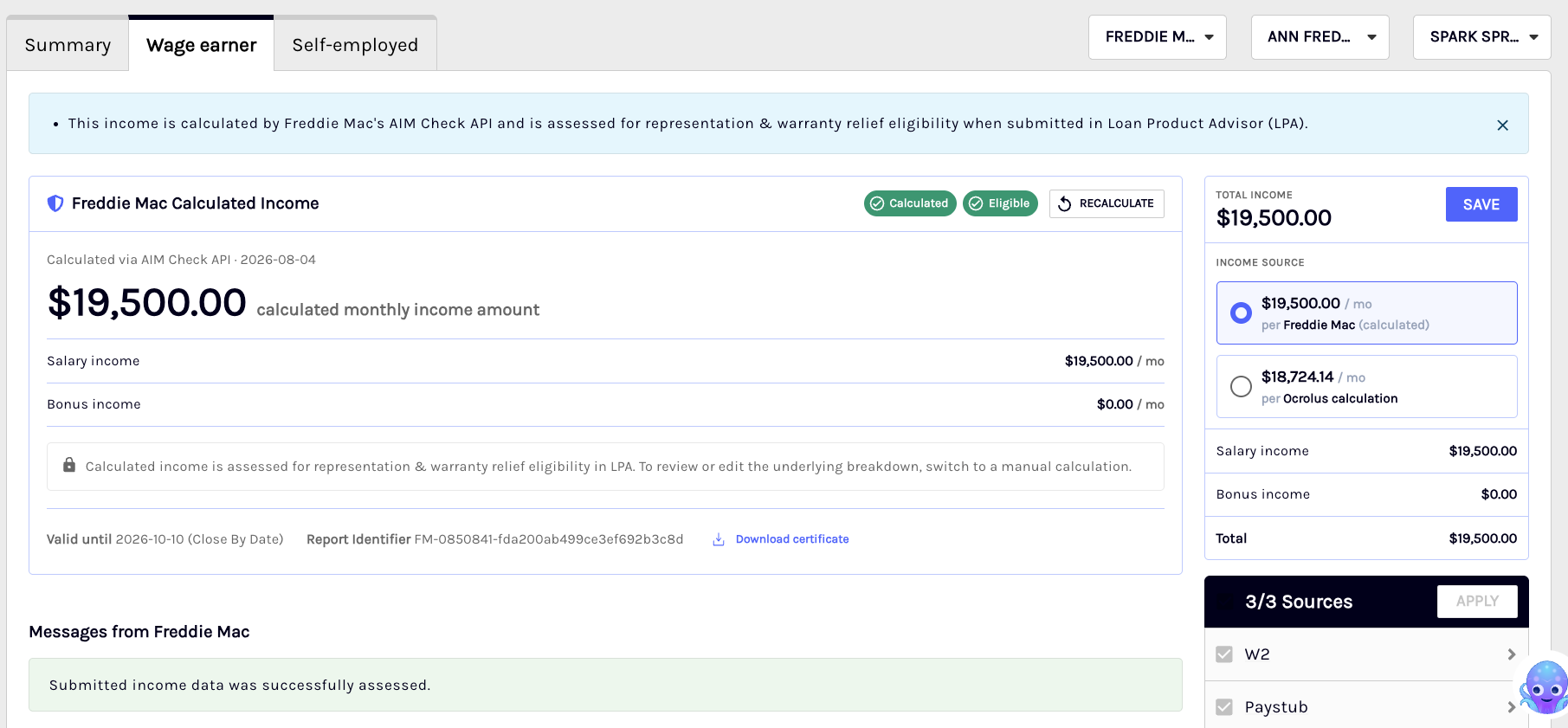
Wage earner tab with the loan-program drop-down set to Freddie Mac and the calculation running/complete.
Step 3: Review your results
When the calculation succeeds, the Wage earner tab shows the result. Read the following two outcomes together:
- Assessment: Confirms Freddie Mac processed your request successfully. The tab shows "Submitted income data was successfully assessed." This does not by itself mean the income is eligible.
- Eligibility: Indicates the likelihood that each income type is eligible for Representation and Warranty (R&W) relief. Each income type shows as Eligible for AIM or Not Eligible for AIM, with Freddie Mac's reason. The formal R&W eligibility assessment is an LPA function, determined downstream when the loan is submitted to Loan Product Advisor.
Note
- If the borrower's employment start date is missing, the result comes back as Not Eligible for AIM with the reason Employment Start Date Missing.
- AIM Check communicates AIM Eligibility, an indicator of the likelihood that income will be eligible for R&W relief. The formal R&W eligibility assessment is determined downstream by Loan Product Advisor (LPA). Always review the AIM Eligibility result for each income type before proceeding.
If Freddie Mac cannot assess the income or the request has a data problem, an error message is returned on the tab. To learn more about the common error messages, error code, and how to resolve them, see the Troubleshooting and Known errors sections.
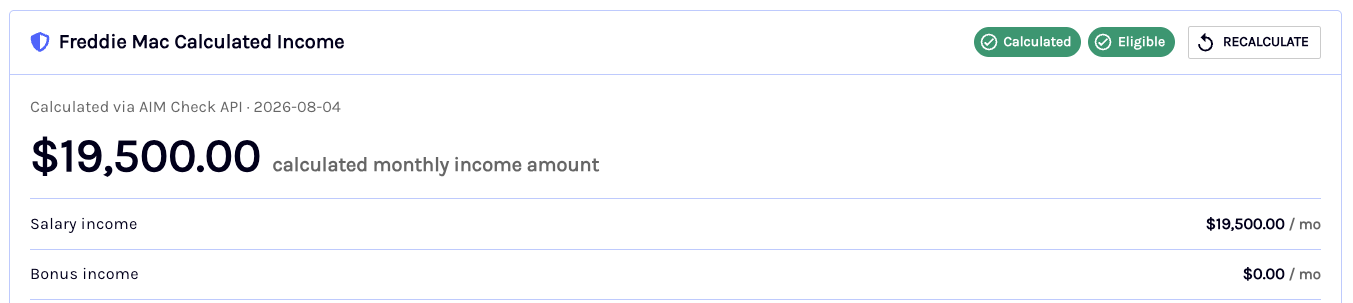
Successful message. Results view: success message, per-income-type eligibility, Freddie-derived income, and the certificate download.
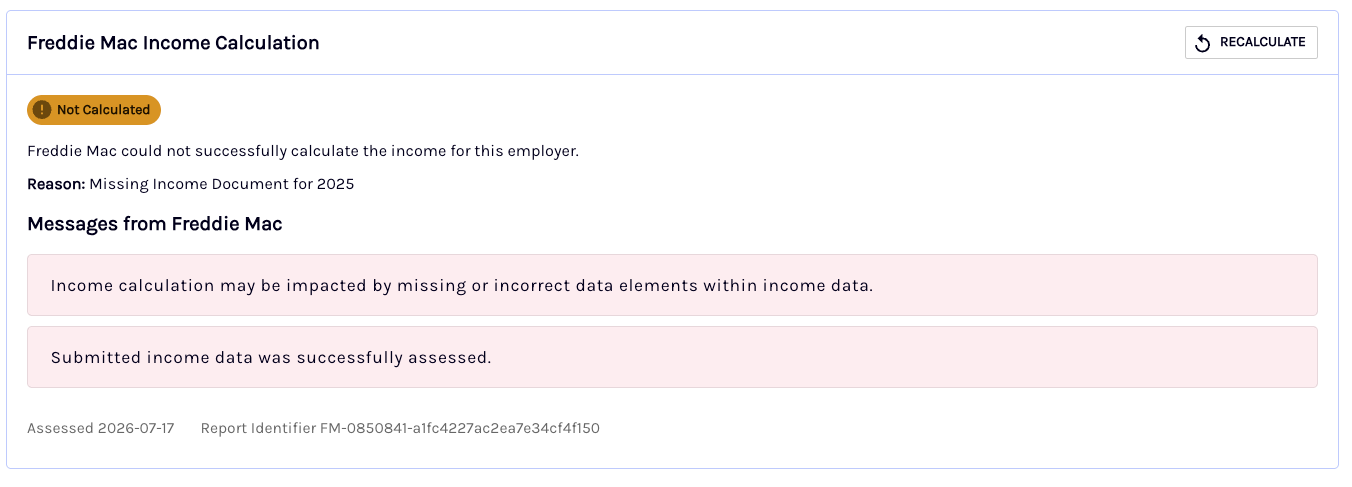
Error message
Step 4: Switch to a manual calculation (optional)
If you'd rather use Ocrolus's own income calculation, select the Ocrolus option using the radio button on the right-hand side of the Wage earner tab. You can switch back to Freddie Mac at any time.
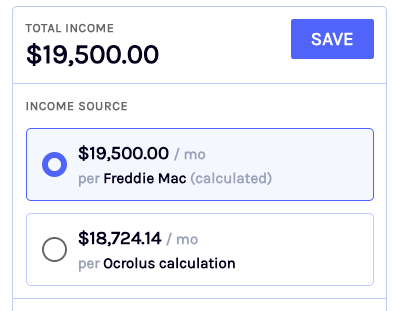
Step 5: Re-run the calculation (optional)
If you update the documents or want to submit again, select the refresh re-run button to run the Freddie Mac income calculation again.

Step 6: Download the certificate or import to Encompass
Download the Freddie Mac certificate PDF from the Wage earner tab. If your loan is connected via Encompass Partner Connect, select Import to Encompass to write the certificate titled Freddie Mac AIM Check Assessment, and the Freddie-derived income back to the loan.
Step 7: Submit the report ID to LPA
To use the AIM Check result in Loan Product Advisor, enter the report ID in Encompass and resubmit the loan to LPA:
-
Copy the report ID shown as Report Identifier next to the result on the Wage earner tab, or on the certificate PDF.
Add
FM:in front of it and enter it in the following field:- Borrower:
GSEVENDOR.X43 - Co-borrower:
GSEVENDOR.X44
For example, the report ID on screen is
FM-0463975-1a2b3c4d5e6f7a8b9c0d1e2f, and you enterFM:FM-0463975-1a2b3c4d5e6f7a8b9c0d1e2f. - Borrower:
-
Resubmit the loan to LPA.
NoteThe value you enter contains
FMtwice: theFM:prefix you add, and theFM-at the start of the report ID.The
0463975part is the same on every report; the last part is unique to each report.
Supported income types
AIM Check supports the following income types for wage earner (pre-close) borrowers documented with pay stubs and W-2s.
| Income type | Notes |
|---|---|
| Base | Primary wage earner income from pay stubs and W-2s. |
| Bonus | Variable income; requires supporting documentation to derive a value. |
| Commission | Variable income; requires supporting documentation to derive a value. |
| Overtime | Variable income; requires supporting documentation to derive a value. |
NoteVariable income (Bonus, Commission, and Overtime) is derived from the documentation provided. A single current pay stub may not establish a value for these types.
Known errors
If the Freddie Mac calculation cannot complete, one of the following messages is shown on the Wage earner tab under Messages from Freddie Mac. The messages are Freddie Mac's own wording. Most are resolved by confirming the documents are uploaded and linked to the borrower, then re-running.
| Message | Code | What it means | What to do |
|---|---|---|---|
| Submitted income data was not successfully assessed. | AIM901 | The submitted income could not be assessed. | Confirm the required pay stub(s) and W-2 are uploaded and linked to the borrower, then re-run. |
| Income calculation may be impacted by missing or incorrect data elements within income data. | AIM904 | Advisory — the calculation may be affected by missing or incorrect data. | Review the flagged data. For example, application received date. The result may still be usable. |
| No viable income records found. Review and resubmit. | AIM906 | No viable income records were found. | Confirm usable pay stub/W-2 income is uploaded, then re-run. |
| Unable to assess submitted payroll data due to internal server error. Review and resubmit. | AIM907 | Freddie Mac internal error (temporary). | Wait a moment and re-run. |
| All income documents may not have been linked to a borrower. Please ensure all SSNs and borrower names are correct and provide AKAs if applicable. | AIM908 | Freddie Mac couldn't match the documents to the borrower, usually a name difference (maiden or married name, nickname). Freddie Mac derives no income when this comes back. | Check the name on the pay stubs and W-2s against the loan, then re-run. |
| API was unable to process the submitted data because one of the Income/Employment fields were not linked. Please verify and resubmit. | AIM025 | One of the income or employment fields wasn't linked. This usually appears together with AIM908. | Check the name on the pay stubs and W-2s against the loan, then re-run. |
| No income documents were linked to a borrower. Please ensure all SSNs and borrower names are correct and provide AKAs if applicable. | AIM909 | No documents were linked to a borrower. | Link the documents to the borrower (check SSNs and names), then re-run. |
| API is unable to assess the submitted data at this time. Please resubmit or contact Customer Support at (800-FREDDIE) for assistance. | AIM021 | Freddie Mac is temporarily unable to assess the data. | Re-run. If it persists, contact support (800-FREDDIE). |
Items needed before Freddie Mac can continue
Before sending a request to Freddie Mac, Ocrolus checks the borrower's details and documents. If something is missing, the Wage earner tab shows the message "Freddie Mac needs the following before it can continue. Resolve the items below, then recalculate." followed by one or more of these items:
| Item | Message |
|---|---|
| Paystub | Upload a recent paystub for this employer. |
| W-2 | A W-2 is required for this borrower and wasn't found. Upload it, then recalculate. |
| Social Security number | Freddie Mac requires the borrower's Social Security number. It wasn't found on the loan application or on this borrower's W-2s or paystubs. Upload a W-2 that shows the SSN, then recalculate. |
| Borrower name | The borrower's first and last name could not be read. Confirm the borrower record. |
| Employer | No employer was found for this borrower. Check that a paystub or W-2 is uploaded and classified for them, then recalculate. |
| Employer name | The employer's name couldn't be read from the documents or the loan application. Correct it in document review, then recalculate. |
| Document size | This borrower's income documents are too large. Freddie Mac caps a request at 16MB once encoded, which is roughly 12MB of PDF across all of the borrower's employers. Re-upload the largest documents as smaller scans — greyscale at 200-300 dpi — then recalculate. |
Importing to Encompass
If your Book is connected to Encompass through Partner Connect, select Import to Encompass on the Wage earner tab to write the results back to the loan. Ocrolus imports:
- The Freddie Mac certificate PDF titled Freddie Mac AIM Check Assessment into the eFolder.
- Income eligibility and Freddie-derived income amounts.
NoteImport to Encompass requires the loan to be connected via Encompass Partner Connect and unlocked. If the loan is locked, unlock it in Encompass and try again.
Requirements and limitations
| Requirements | Limitations |
|---|---|
| Minimum documents | The borrower's most recent pay stub and the prior year's W-2 are needed to produce an assessment. Include the W-2 for the year before, if the borrower has it. |
| Employment start date | Required. Without it, the result comes back as Not Eligible for AIM (Employment Start Date Missing). |
| Scope | Wage earner (pre-close) payroll income. Self-employed and asset scenarios are not part of this integration. |
| Access | The service is available from within the United States. |
| No manual entry | AIM Check uses the extracted document data. If required data is missing then re-upload or reprocess the documents rather than entering values manually. |
Troubleshooting
| If you see… | What it means | What to do |
|---|---|---|
Not Eligible for AIM (Employment Start Date Missing) | The borrower's employment start date wasn't available for the assessment. | The start date comes from the Encompass loan application, a VOE, Work Number or Form 1005, an uploaded 1003, or the hire date on the pay stub. Upload a document that shows it, then re-run. |
Not Eligible for AIM (Expired Income Documents) | The pay stub is too old relative to the application date. | Upload a more recent pay stub and re-run. |
Not Eligible for AIM (Missing Income Document for {year}) | No W-2 or year-end pay stub was found for the listed year. | Upload that year's W-2 and re-run. |
| A request appears blocked or unavailable | The Dashboard is being accessed from outside the United States. | Access the Ocrolus Dashboard from within the U.S. and retry. |
| A message under Messages from Freddie Mac | Freddie Mac couldn't assess the income, usually a missing document or linking issue. | Confirm the paystub(s) and W-2 are uploaded and linked to the borrower, then re-run. See the Known errors table for each message. |
| Loan is locked on import | The Encompass loan is locked. | Unlock the loan in Encompass and retry the import. |
| No value for bonus, commission, or overtime | Variable income needs supporting documentation. | Upload the documents that establish that income and re-run. |
| This lender is not yet authorized with Freddie Mac to submit through Ocrolus. Complete the seller (Submitting Party) relationship with Freddie Mac, then recalculate. | The Tools Request Form registration isn't complete, or the Seller number Ocrolus has doesn't match Freddie Mac's. | Confirm the registration with Freddie Mac and your Seller number with your Ocrolus contact. See Setting up Freddie Mac AIM Check. |
Related resources
Complete the one-time setup to connect Ocrolus to your Freddie Mac account and enable AIM Check for your organization.
Learn how Ocrolus integrates with the Fannie Mae Income Calculator for rep-and-warranty-backed income calculations.
Understand how Ocrolus calculates and displays wage earner income in the
Analyze mortgage dashboard.
Learn how to use Ocrolus Analyze to verify and update income calculations for mortgage underwriting.
Set up and use Ocrolus within your Encompass environment for document classification, detection, and income analysis.
Updated 21 days ago