
Activity log
The Activity log provides a comprehensive, time-ordered record of all actions performed across Books and organization settings in the Ocrolus Dashboard. It enables you to track changes, identify responsible users, and understand the sequence of events without relying on support intervention.
At its core, the Activity log answers critical audit and operational questions such as who performed a specific action, what was changed, and when it occurred. This includes actions like document uploads, transaction edits, configuration updates, exports, and user management activities.
Key benefits
- Trace every action on a borrower file: When a decision is questioned or a file requires QA review, you can view the full history of activity including document uploads, deletions, transaction edits, exports, and classification changes in one place, ordered by time.
- Audit configuration changes across your organization: Tags, revenue formulas, and kickout criteria affect analytics across all Books in your organization. The Activity log records every change to these settings, including who made the change and the previous and updated values.
- Reduce time spent investigating discrepancies: Instead of raising a support ticket to determine what changed on a Book or who updated an organization setting, you can find the information directly in the dashboard.
- Support compliance and internal QA: The Activity log is immutable. Entries cannot be edited or deleted. This provides your compliance and risk teams with a reliable record of actions for audit purposes.
Common use cases
The following are common scenarios where you can use the Activity log to investigate changes, verify actions, and support audit workflows:
- A borrower file is under QA review and you need to confirm the sequence of actions that led to its current state.
- An underwriter notices unexpected analytics output and wants to check whether a tag, revenue formula, or kickout rule changed recently.
- Your compliance team needs to demonstrate an auditable history of actions for a specific Book.
- An admin wants to verify who was added to or removed from the organization’s team.
- You need to confirm when a specific export, such as captured data, Book summary, or SMB analytics, was last downloaded and by whom.
Activity log structure
The Activity log is organized into two levels: Book level and organization level. Each level captures a different set of events based on where the action occurs.
Book-level activity
The Book-level Activity log captures all actions taken on a specific Book. You can access it by selecting the Activity (clock) icon in the Book header. It opens as a side modal from any section within the Book.
Each event includes a timestamp, the user who performed the action identified by email, the event category, and a short description. You can select an event to view additional details such as previous and updated values, file names, or transaction references. You can filter the activity feed by category, user, and date range. The feed supports pagination for long histories.
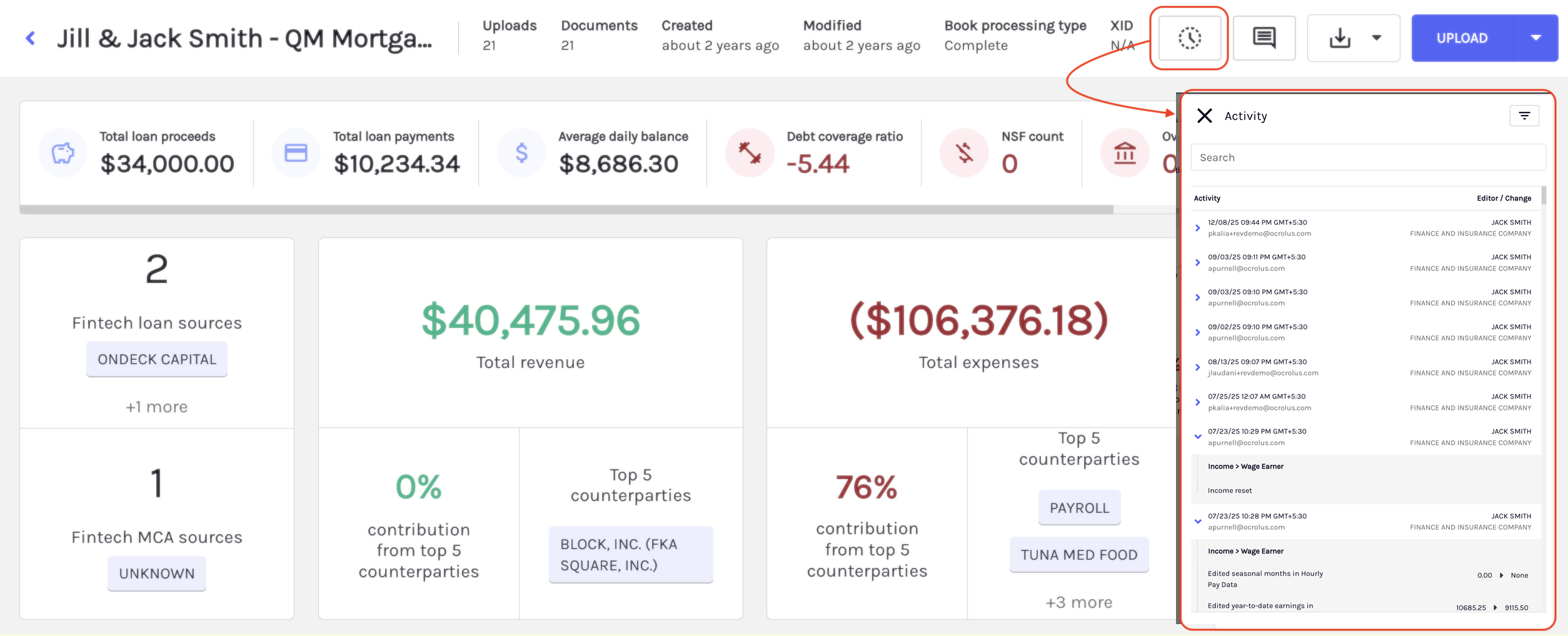
Event categories tracked at the book level
| Category | Actions logged |
|---|---|
| Book actions | Book created, renamed, or deleted. Documents uploaded or deleted. Processing type changed. XID changed. Sharing or permissions updated. |
| Industry classification | Classification changed or reset, with previous and updated NAICS values shown in the detail panel. |
| Transactions | Tags added or removed, comments added or edited, transactions starred or unstarred. The detail panel shows the transaction name, amount, date, and the specific changes made. |
| Exports | Any export generated such as captured data JSON, captured data CSV, Book summary, bank statement income, bank statement income legacy, or SMB analytics. The file name is shown in the detail panel. |
| Docs-to-Digital | Plaid JSON file uploaded for reconciliation, with the file name shown in the detail panel. |
Organization-level activity
The organization-level Activity log captures configuration and administrative changes that affect your entire organization. Each area has its own Activity log, accessible from its management screen using the Activity (clock) icon. You can filter organization-level activity by date, action type, and user. Search is available for faster discovery. Only users with admin permissions can view organization-level activity.
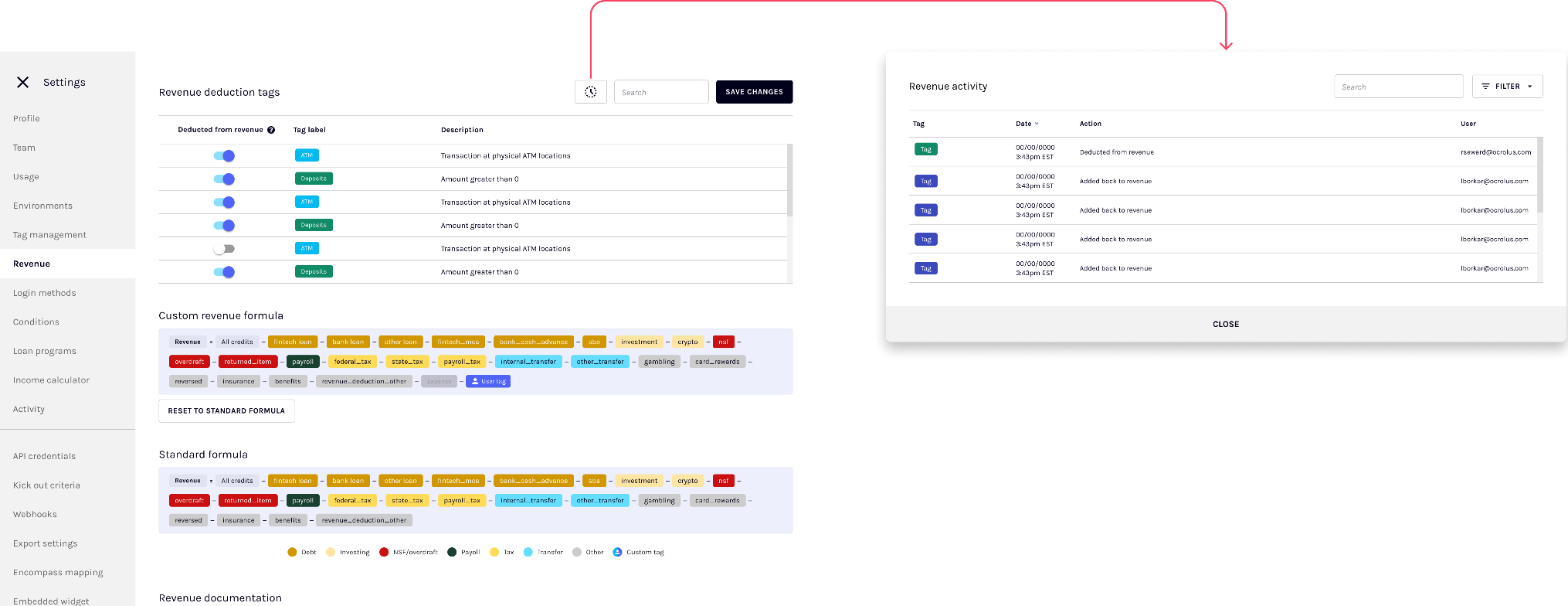
Event categories tracked at the organization level
| Area | Where to access | Actions logged |
|---|---|---|
| Tags | Tags management screen | Tag created, modified including name, description, color, terms, and thresholds, or deleted. The detail panel shows previous and updated values for each field. |
| Revenue formulas | Revenue formulas screen | Formula added, modified, or deleted. |
| Kickout criteria | Kickouts management screen | Values added or removed from lists such as states, NAICS codes, and industries. Thresholds updated including revenue, expenses, NSF count, and debt positions. Multiple changes are grouped into a single event. The detail panel shows structured differences. |
| Accounts | Team screen | User invited, created, modified including role or status changes, or removed. |
Data retention
Activity log events are immutable. No user, including admins, can edit or delete entries. The Activity log retains events in the dashboard for one year. Events older than one year are moved to cold storage and are not accessible in the dashboard. Contact Ocrolus support if you need access to historical records.
Updated 5 months ago