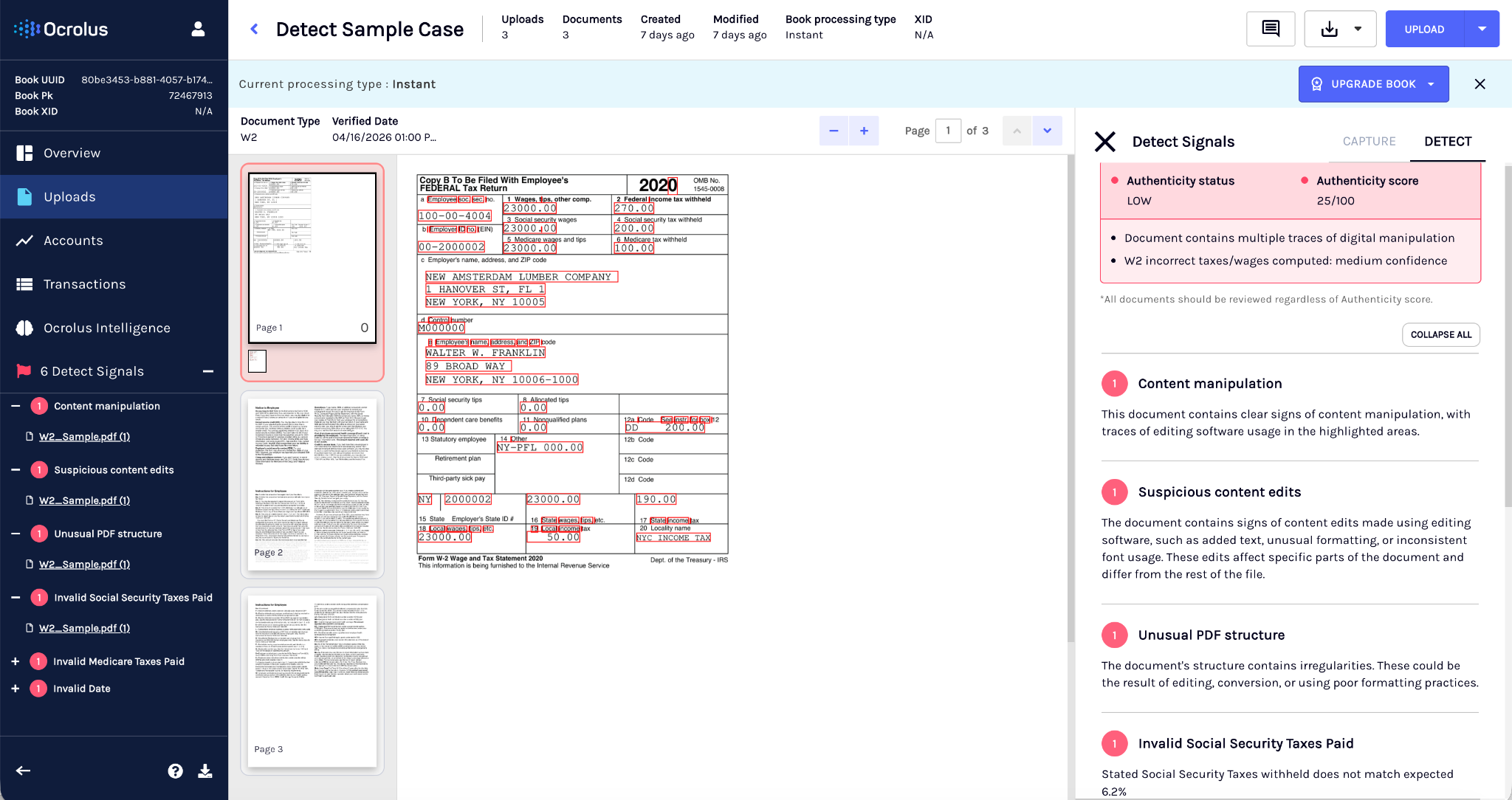
Authenticity status

Authenticity Status provides a simple and tiered outcome for document integrity. It works alongside the Authenticity Score (0–100) and uses the same underlying detection signals. It helps operational teams quickly understand document risk while preserving detailed scoring for automation and policy workflows.

🚧

This feature is in beta!

This page discusses functionality that is in beta. You may occasionally experience unannounced changes or bugs. We'd greatly appreciate your feedback on this feature and its accompanying documentation.

The system returns both:

  • Authenticity Score: Numeric score from 0 to 100
  • Authenticity Status: A categorical result used for routing and review

Together, these outputs provide both precision for automated workflows and clarity for frontline review.

Users of Authenticity Status

Authenticity Status supports teams responsible for fraud detection, risk management, compliance, and operational review. It is commonly used by fraud analysts, underwriters, processing teams, review operations, and QA teams during document review, audits, and post-close verification workflows.

Authenticity Score vs. Authenticity Status

FeatureAuthenticity ScoreAuthenticity Status
Output typeNumeric value (0–100)Categorical result
PurposeProvides detailed integrity scoringProvides a clear decision outcome
Calculation methodBased on content analysis, document structure analysis, and manipulation detection signalsDerived from the Authenticity Score and integrity signals
InterpretationLower scores indicate higher risk of manipulationCategories represent document risk levels
Typical useAutomated decision rules, threshold-based workflows, and risk scoring modelsOperational routing and manual review workflows

Viewing Authenticity Status results

Detect results are available in both the Ocrolus dashboard and API responses.

Dashboard

The Dashboard provides a quick overview of document integrity results. It displays the Authenticity Status to quickly assess document risk and determine the next action. The detail view provides more context for each detected issue. It shows grouped fraud flags along with their severity levels, explanations, source attribution, and supporting evidence. This information helps reviewers understand why a document was flagged and supports deeper investigation when needed.

API output

Detect also returns results through the API. The response payload appears similar to the following example:

{
  "form_authenticity": {
    "version": "1.0",
    "score": 20,
    "authenticity_result": {
      "decision": "LOW",
      "value": "SERIAL_FRAUD",
      "label": "Document is part of a detected serial fraud cluster"
    },
    "reason_codes": [
      {
        "code": "100-M",
        "confidence": "MEDIUM",
        "description": "Bank statement account number tampered"
      }
    ]
  }
}

Document evaluation process

Detect analyzes each document during processing using multiple methods to detect anomalies and signs of manipulation. These checks help identify digitally altered or fabricated documents.

Analysis typeWhat Detect analyzesExamples
Content analyticsDocument data and extracted fieldsInconsistent values across fields, unexpected transaction patterns, or duplicate/ unusual entries
Deep forensic analysisFile structure and visual elementsAltered metadata, rasterized text overlays, inserted image layers, or compression inconsistencies

Detect outputs and evidence

Detect returns a set of outputs that help users understand document integrity and determine the appropriate action for a document. These outputs combine a numeric authenticity score, a categorical Authenticity Status, and supporting evidence that explains why a document was flagged.

Together, these outputs allow teams to quickly assess document risk while still providing the detailed signals needed for automated workflows and deeper investigation.

Output components

Detect returns several outputs that help reviewers understand document integrity and decide how to handle a document. These outputs combine scoring, categorical results, and supporting evidence to provide both operational decision-making and detailed signals for analysis.

The outputs include the following components:

  • Authenticity Score (0–100): A numeric score that represents the overall integrity of the document. The score is calculated using multiple fraud detection signals, including pixel-level analysis and file-structure analysis designed to detect document manipulation.

  • Authenticity Status: A categorical result derived from the Authenticity Score and detection signals. This status helps operational teams quickly determine how a document should be handled.

  • Reason codes: Detect provides explainability for each authenticity result through reason codes and structured flags. Reason codes explain why a document received its score or status and identify the issue detected during analysis. For example, 100-M — Bank statement account number tampered. Each reason code includes a code identifier, a confidence level, and a human-readable description of the detected issue.

  • Structured flags: Indicators that identify potential fraud signals detected during analysis. These flags are grouped into categories to make them easier to interpret.

  • Audit trail: A record of processing actions and evaluation results for the document. This supports traceability, compliance, and audit requirements.

  • Applicant rollup fields: Aggregated signals calculated across all documents associated with an applicant. These fields provide a broader view of the applicant’s overall risk profile.

Authenticity Status modes

Authenticity Status categorizes a document based on its integrity signals and Authenticity Score. This classification helps operational teams quickly determine how a document should be handled in a workflow. Detect supports the following two Authenticity Status modes. You can configure Detect to return binary or ternary Authenticity Status depending on their workflow requirements.

  • Ternary mode (default): This is a default which provides three possible outcomes: High (Pass), Medium (Review), and Low (Fail). High indicates low integrity risk and documents can proceed or be automatically approved. Medium indicates moderate risk and the document should be reviewed manually. Low indicates high risk and the document should be escalated or rejected.
  • Binary mode: This provides two outcomes: High (Pass) and Low (Fail). High indicates the document meets authenticity checks and can proceed in the workflow. Low indicates integrity concerns and the document should be rejected or escalated.

Fraud detection flags

Detect identifies potential fraud indicators during document analysis and organizes them into structured flags. These flags help reviewers understand what type of issue was detected and where it occurred. Flags are grouped into categories that describe different types of document anomalies.

CategoryDescriptionExamples
File integrityIdentifies manipulation at the file level.Altered metadata, inconsistent embedded fonts, rasterized text overlays, inserted image layers, compression anomalies
Content consistencyDetects anomalies in the document’s data or values.Duplicate transactions, mismatched balances, recurring cloned deposits, inconsistent income values
Layout anomaliesDetects irregularities in the visual structure of the document.Cloned tables, misaligned headers, uneven spacing, repeated template regions

Each flag includes the following information that helps you understand the severity and impact of the detected issue:

  • Severity (low, medium, high): Indicates how serious the detected issue is.
  • Score impact: Shows how the flag affects the overall authenticity score.
  • Explanation: Provides a clear description of the issue that triggered the flag.
  • Source attribution: Identifies the system or provider that detected the issue