
Wage earner income
The wage-earner income is an earning derived from a borrower’s employment, typically through regular salary or hourly wages, as documented by pay stubs, employment offer letter, WVOEs (Verification of Employment), and W2s. Each source of wage-earner income is broadly categorized as one of the following:
- Base income (hourly/salaried): All earnings that are considered regular earnings are part of the Base Income.
- Bonus: Compensation paid above and beyond the standard income expectation, not necessarily in a predictable manner.
- Commission: Compensation paid based on sales made or services performed.
- Employment Offer Letters: Income calculated from an offer letter using the provided pay format.
- Military entitlements: Compensation from enlistment in the United States military.
- Miscellaneous income: Recurring employment income that couldn't be categorized.
- Overtime: Income earned for hours worked above the standard or expected weekly hours.
- Shift differential: Compensation paid at a premium pay rate for hours worked at non-traditional times, such as nights, weekends, or holidays.
Documents utilized
Ocrolus requires the following documents to calculate wage earner income. Anything not listed is not currently used for this purpose.
- Pay stubs
- Employment offer letter
- W-2s
- Written Verifications of Employment (WVOE)
- VOE (generic) - Verification of Employment Report
- VOE (1005) - Request for Verification of Employment
Employment offer letter
When a borrower provides an employment offer letter, the system uses it directly for income calculation and employer detail creation. The hire date on the offer letter is used as the employment start date. Income is calculated based on the pay format stated in the letter, whether annual, bi-weekly, semi-monthly, weekly, monthly, or an hourly rate multiplied by hours worked, capped at 40 hours per week. Two alerts are triggered when an offer letter is used: the letter must be signed and dated by both parties, and all contingencies stated in the letter must be satisfied prior to closing.
Income calculation guidelines
It is recommended to adhere to the following key guidelines while doing income calculation using Ocrolus:
- Only documents from the current year and the last two years are considered for income calculation (Pay stub/VOE/W2s).
- Pay stubs/WVOEs from the current year without year-to-date (YTD) values are not considered for calculation.
- Pay stubs without an end date are not considered for calculation.
- Ocrolus prefers extracting income from pay stubs over WVOEs, but if both are available for a given pay period, the most up-to-date document will be used.
- If there is a tie between documents, the one listing the highest earnings will be selected.
- Pay stubs listing multiple bonuses, commissions, overtime, or other earnings will have those amounts combined as a single earning.
- If a pay stub clearly states Hourly or Salary, Analyze uses that information to determine the pay type. If this detail is not provided, Analyze compares the pay rate with the current pay. If they match, it classifies the pay as salary; otherwise, it defaults to hourly.
- Wage-earner income sources benefit from three years of data, though one or two years can be used with potential alerts.
- One-off payments are generally excluded from calculations, except for bonus income.
- If YTD income isn't clearly itemized on a paystub, Analyze doesn't use it for calculations. Instead, it alerts you that a Written Verification of Employment (WVOE) is required for accurate assessment.
- The document preview panel is draggable. Click and drag the panel header to reposition it anywhere on the screen. This helps you view income calculation fields and the source document at the same time. The panel returns to its default position when you navigate away from the page.
- If a borrower earns income from more than one employer, such as a union worker or a borrower who changed jobs, see Merge with other employers.
- To see when Ocrolus marks wage-earner income as Recommended, see Recommended income.
Determining the current employer
Ocrolus looks at the Book's creation date and the ending date of each contained pay stub to determine which employers are current.
An employer is considered current if the Book contains a pay stub with an end date no more than 60 days prior to the Book's creation.
For income types that use pay stubs, those from previous years are considered part of the current employer if the names match with the current year's stubs. In such cases, older pay stubs contribute solely to calculating current income.
If no employer is recognized, whether for current or past years, Unknown is used as a placeholder, while income calculations proceed as normal.
Consider the below example:
| Book creation date | Most recent pay stub period | Is this employer current? |
|---|---|---|
| January 15, 2021 | December 1, 2020 - December 31, 2020 | Yes |
| July 3, 2020 | May 31, 2020 - June 30, 2020 | Yes |
| November 5, 2021 | March 6, 2021 - March 20, 2021 | No |
| February 8, 2021 | November 6, 2020 - December 6, 2020 | No |
If a Book contains multiple eligible pay stubs from different employers, the most recent pay stub determines the current employer.
Merge with other employers
Some borrowers earn wages from more than one employer in the same period. Union and dispatched workers typically receive a separate W-2 and separate pay stubs from each employer they are assigned to. Borrowers who changed jobs can have overtime, bonus, commission, or other variable income that spans two employers. By default, Analyze calculates wage-earner income for one employer at a time.
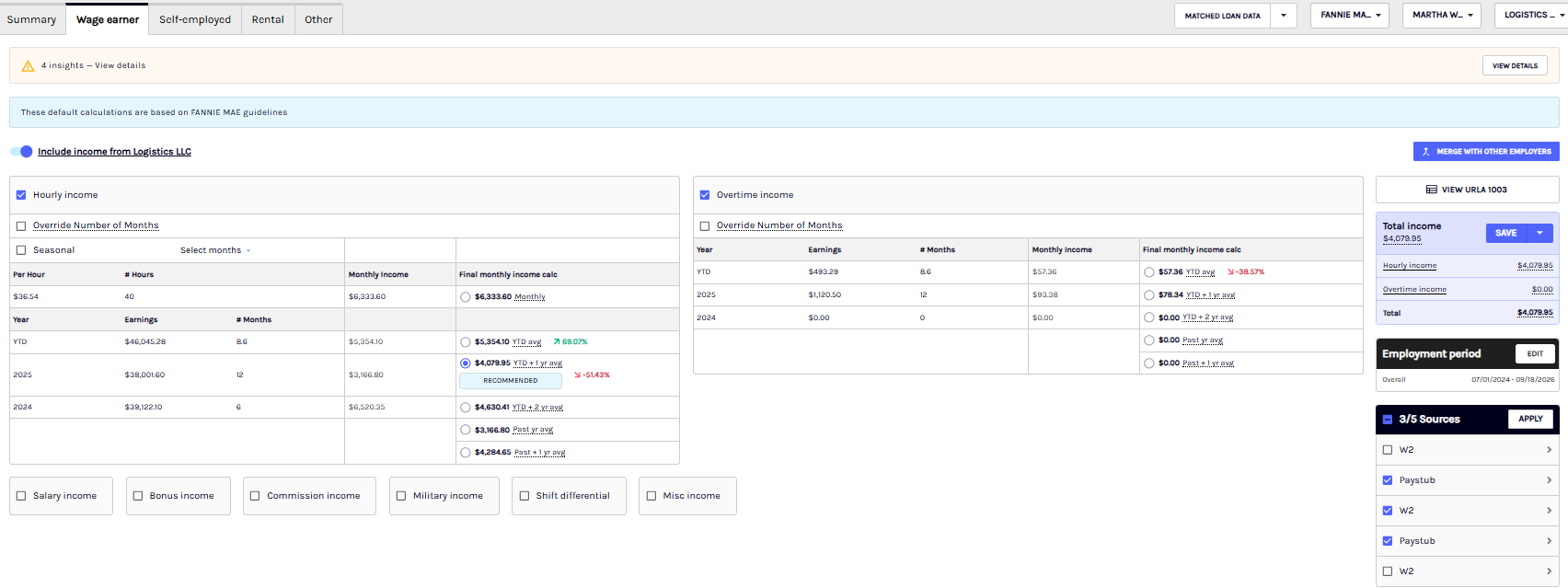
Merge with other employers combines two or more employers into one continuous employment record and averages income across the full combined period. The button is available when a Book has two or more employers.
To see how this feature works from start to finish, watch the feature video.
When to use it
- A union or dispatched worker has W-2s and pay stubs from multiple employers in the same year.
- A borrower changed employers, and variable income such as overtime, bonus, commission, or shift differential spans both employers.
Run a merge
-
On the Wage earner tab, select Merge with other employers. The Calculate income from multiple employers panel opens.
-
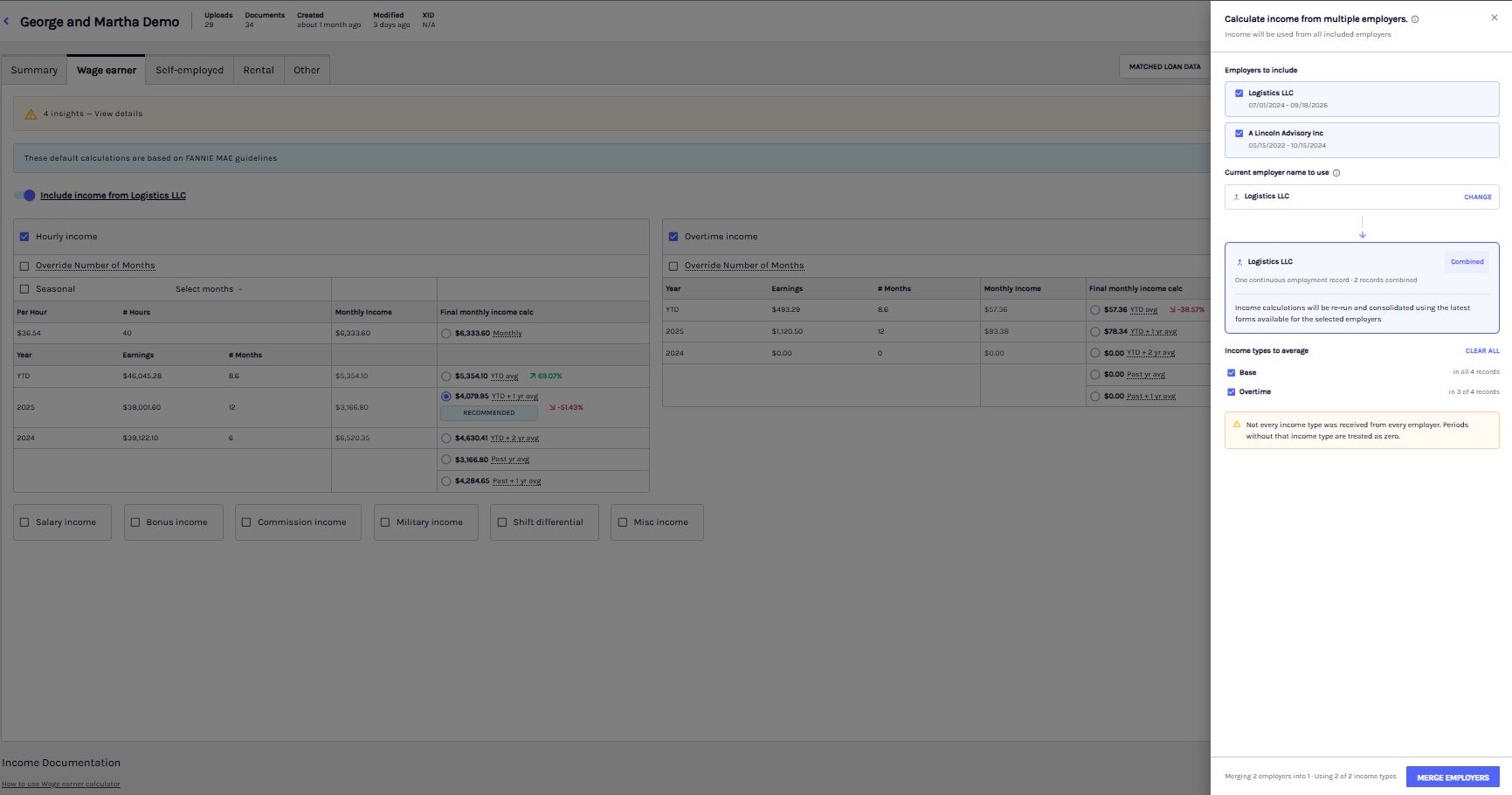
Under Employers to include, review the employers. Each employer shows its employment period. Clearing an employer removes it from the merge and updates the preview, for example "2 records combined".
-
Under Current employer name to use, confirm the name for the combined record. Select Change to use a different name.
-
Under Income types to average, select the income types to combine: Base, Overtime, Bonus, Commission, and Misc. Each type shows how many of the selected employer records contain it.
-
Review the preview card, which shows one continuous employment record and the number of records combined. The panel footer shows how many employers are merged into one and how many income types are used, for example "Merging 3 employers into 1. Using 5 of 5 income types".
-
In the panel footer, select Merge employers. Analyze shows a "Recalculating income" state while it merges employment periods, regroups income documents, and recalculates monthly income. The page then shows the combined income.
How income is calculated
- Document selection: For each selected employer, Analyze uses the most recent year-to-date (YTD) document and the most recent year-end document, and takes the income for each income type from those documents. Multiple pay stubs from the same employer are not added together.
- Combined average: Analyze sums each selected income type across all selected employers, then averages it over the total combined employment period of those employers.
- Multiple W-2s in a year: When a borrower has more than one W-2 for the same year, the combined year row shows the sum of earnings from all of them. The monthly income and the Final monthly income calc options use the summed earnings. A single W-2 in a year is handled as before.
- Averages: Analyze recalculates the YTD average, the YTD + 1 year average, the YTD + 2 year average, and the past-year averages on the combined history for each income type.
- Default selection: The selected income guideline (Fannie Mae, Freddie Mac, FHA, VA, or USDA) continues to determine the default selection, as described in the income type sections below. A different average can be selected with its radio button.
- Employment period: The combined record shows one overall employment period that covers all merged employers.
Example: A union electrician is dispatched to three contractors over two years. Merging the three employers sums the earnings for each selected income type across the contractors and averages them over the total combined employment period of the three, instead of averaging over the period worked for a single contractor.
After merging
- The employer is tagged Merged - recalculated.
- A banner reads "Combined income and employment details from [number] employer records" and includes View records and Undo.
- Total income, the Employment period, and Sources update to reflect the combined record.
- Select View records to open the Merged employers panel, which lists the employers included in the merged record and the employment period of each.
- Select an earnings value in an income table to open a side panel with the source documents behind it: document type, employer name, period, and the amount each contributed. Where a value combines several sources, the amounts add up to the value in the table.
- The income worksheet reflects the same information shown on the Wage earner tab. The merged employers appear as a single employment record under the current employer name you selected, with the recalculated income.
Undo a merge
To reverse a merge, select Undo on the banner. Analyze shows a loading indicator and disables the button until the merge is removed. The original employer records and their income are restored, and the message "Merged income removed successfully" appears. If the request fails, the loading indicator is removed and an error message is shown.
Employment start date sourced from Encompass
Analyze pulls the borrower’s employment start date directly from Encompass to improve income calculation accuracy and reduce manual data entry. This applies to both wage-earner (borrower/employer) and self-employed (borrower/business) income, with entity matching to ensure the correct association.
The employment start date is visible in the Dashboard and can be manually edited by lenders. When Encompass is used as the source, Analyze displays a low-severity alert prompting lenders to provide supporting documentation. If a WVOE form is available, its start date is prioritized as the source of truth. This supports both Ocrolus income and Fannie Mae income start date fields.
Recommended income
Ocrolus marks wage-earner income as Recommended only when the file includes the minimum documentation required by the selected investor's manual underwriting guidelines for income and employment. The supported investors are Fannie Mae, Freddie Mac, FHA, VA, and USDA.
The documentation requirements affect only the Recommended tag. Ocrolus still calculates and displays every income calculation method for the borrower. The tag applies to wage-earner income only.
Documentation requirements
The requirements depend on the selected investor, the type of income, and the employment history shown in the submission. In the tables below, YTD means year-to-date income documentation. Prior year means income documentation for the most recent calendar year, and prior 2 years means income documentation for the two most recent calendar years. Documentation can include pay stubs, W-2s, year-end pay stubs, or a verification of employment (VOE).
No employment dates, or two or more years of history
These requirements apply when the submission does not include employment start dates, and when the dates show an aggregate history of at least two years.
| Income type | Fannie Mae / Freddie Mac | FHA / VA | USDA |
|---|---|---|---|
| Salary or hourly, primary job only | YTD + prior year | YTD + prior 2 years | YTD + prior year |
| Salary or hourly, secondary job, or primary job with a secondary job | YTD + prior 2 years | YTD + prior 2 years | YTD + prior year |
| Overtime, bonus, or commission, any job | YTD + prior 2 years | YTD + prior 2 years | YTD + prior 2 years |
Less than two years of employment history
These requirements apply when the employment dates show less than two years of history.
| Income type | Fannie Mae / Freddie Mac | FHA / VA | USDA |
|---|---|---|---|
| Salary or hourly, primary job | YTD + prior year | Not recommended | YTD + prior year |
| Salary or hourly, secondary job | Not recommended | Not recommended | YTD + prior year |
| Overtime, bonus, or commission, any job | Not recommended | Not recommended | Not recommended |
Not recommended means Ocrolus still calculates the income and shows the math. The file cannot carry the Recommended tag under that history.
Factors that affect the Recommended tag
Employment dates, missing documents, and uploads determine whether a file carries the Recommended tag:
- Employment dates: Dates come with the submission, for example through a loan application, an LOS integration, or an employment verification document. Files uploaded to the Dashboard as pay stubs and W-2s alone do not include them. Without dates, the first table applies. With dates showing two or more years of continuous history, the first table applies. With dates showing less than two years of history, the second table applies, which is stricter.
- Current employer only: Ocrolus evaluates the documents and history for the borrower's current employer. It does not combine prior employers when deciding whether to recommend.
- Missing documents: If the file is short of the minimum requirement in the applicable table, Ocrolus still calculates the income and shows the math. The Recommended tag does not appear.
- Additional uploads: Adding documents to the file can bring it up to the requirement.
Recommended is not an underwriting decision
Recommended means the file has the minimum income documentation and Ocrolus suggests this calculation method. It is not a determination that the income qualifies or meets specific product or investor requirements. Ocrolus does not factor in AUS findings, underwriter discretion, or information outside the file, so a loan can have valid income that does not carry the tag. The standard generally follows manual underwriting guidelines and is intentionally conservative for that reason. Your team still reviews the income and confirms it for qualifying and for product and investor requirements.
Recommended is also separate from rep and warranty. Ocrolus' rep and warranty is not limited to the Recommended calculation.
Hourly
Income is considered to be hourly if a pay stub/VOE meets all the following conditions:
- Income is categorized under types such as hourly, PTO, and vacation.
- Both an hourly rate and the number of hours worked are specified.
Categorizing hourly earnings
Occasionally, earnings are detected that are suspected to be hourly but are otherwise difficult to classify. These earnings might use a non-standard pay code for a known income type or they might be some unusual employer-specific categorization entirely.
However, these miscellaneous earnings are counted towards hourly income if they meet certain conditions. At a minimum, they must be awarded at the same hourly rate as regular income. In addition:
- If regular and miscellaneous earnings are assigned the same non-zero hourly rate, then their sum is counted as hourly income.
- If regular and miscellaneous earnings are assigned different hourly rates, then regular earnings are counted as hourly income and miscellaneous earnings as other employment income.
- If regular earnings aren't available but miscellaneous earnings are, then it is counted as other employment income.
- If miscellaneous earnings don't meet any of the above conditions, they will be categorized as other employment income.
Calculations
Ocrolus calculates the following income types to provide a comprehensive financial assessment:
- Monthly Period Income
- Year-To-Date Average (YTD Avg)
- Year-To-Date plus 1-Year Average (YTD + 1-Year Avg)
- Year-To-Date plus 2-Year Average (YTD + 2-Year Avg)
- Past 1-Year Average
- Past 2-Year Average
| Income Guideline | Income Determination |
|---|---|
| Fannie Mae | The lowest non-zero value among the following reported income types is used: - Monthly Period Income |
| Freddie Mac | The lowest non-zero value among the following reported income types is used: - Year-To-Date Average (YTD Avg) |
| FHA | The lowest non-zero value among the following reported income types is used: - Year-To-Date Average (YTD Avg) |
| VA | The lowest non-zero value among the following reported income types is used: - Year-To-Date Average (YTD Avg) |
| USDA | The lowest non-zero value among the following reported income types is used: - Year-To-Date Average (YTD Avg) |
All computations are displayed on the Dashboard. If you prefer to use an average other than the lowest value, you can select the corresponding radio button next to the desired average.
If the default months count does not reflect the borrower's actual working period, enable the Override Number of Months toggle on any year row to edit the # Months value directly. This recalculates Monthly Income and all income averages for that row. Use this when a borrower was not employed for the full year and the default months count is pulling down the calculated monthly income.
Calculation logic for hourly income
- To calculate any of the above income values, Ocrolus prefers using WVOE/Pay stubs over W2s.
- For monthly income calculation, the weekly number of hours value is directly extracted from the WVOE/Pay stub. However if the reported value is greater than 40 hours/week, the system will cap the value to 40 hours/week.
- If both the (YTD) income and monthly income (calculated from the hourly rate) are greater than zero, and the YTD income is higher than the monthly income, then the system uses the monthly income as default income.

Salary
Any non-hourly earnings that are classified as regular, PTO, or vacation pay are counted as salaried income.
For a pay stub to be used for salary estimation, the following conditions must be met:
- The pay stub should be from the current employer, or it must be the last one given by the previous employer.
- The pay stub's pay period must have an end date no more than 60 days prior to the Book's creation.
If the current tax year has multiple pay stubs, the salary is derived from the most recent one. If this pay stub lists multiple salary earnings, their sum is considered as one income source.
Calculations
Ocrolus calculates the following income types to provide a comprehensive financial assessment:
- Monthly Period Income
- Year-To-Date Average (YTD Avg)
- Year-To-Date plus 1-Year Average (YTD + 1-Year Avg)
- Year-To-Date plus 2-Year Average (YTD + 2-Year Avg)
- Past 1-Year Average
- Past 2-Year Average
| Income Guideline | Income Determination |
|---|---|
| Fannie Mae | The lowest non-zero value among the following reported income types is used: - Monthly Period Income |
| Freddie Mac | The lowest non-zero value among the following reported income types is used: - Year-To-Date Average (YTD Avg) |
| FHA | The lowest non-zero value among the following reported income types is used: - Year-To-Date Average (YTD Avg) |
| VA | The lowest non-zero value among the following reported income types is used: - Year-To-Date Average (YTD Avg) |
| USDA | The lowest non-zero value among the following reported income types is used: - Year-To-Date Average (YTD Avg) |
For the Monthly Period income, the system uses gross pay value from VOE. If VOE is not recent, then the system uses the value from pay stub.
If the default months count does not reflect the borrower's current salary period, enable the Override Number of Months toggle on any year row to edit the # Months value directly. This recalculates Monthly Income and all income averages for that row. Use this when a borrower changed jobs or returned from unpaid leave mid-year and the full-year average does not reflect their current salary.
Pay frequency
Pay frequency is the time interval at which salaried income is disbursed. Ocrolus recognizes weekly, bi-weekly (every two weeks), semi-monthly (twice a month), annual, and monthly earnings. If a supported pay frequency cannot be identified, it is calculated as Not reported.
Monthly period income
The monthly income is derived from the pay frequency and earnings over that period. The earnings per period are calculated for one month as follows:
- Monthly earnings are used as-is.
- Semi-monthly (twice a month) earnings are multiplied by 2 (24 pay periods ÷ 12 months).
- Bi-weekly (every two weeks) earnings are multiplied by 2.166… (26 pay periods ÷ 12 months).
- Weekly earnings are multiplied by 4.333… (52 pay periods ÷ by 12 months).
- Annual earnings are divided by 12, which is exclusively used for WVOEs.
If pay frequency is unknown but does have an end date for a given pay stub, the value is estimated based on the year-to-date earnings.

Overtime
Any Income earned for hours worked above the standard expected weekly hours is categorized as Overtime Earning
Calculations
Ocrolus calculates the following income types to provide a comprehensive financial assessment:
- Year-To-Date Average (YTD Avg)
- Year-To-Date plus 1-Year Average (YTD + 1-Year Avg)
- Year-To-Date plus 2-Year Average (YTD + 2-Year Avg)
- Past 1-Year Average
- Past 2-Year Average
| Income Guideline | Income Determination |
|---|---|
| Fannie Mae | The lowest non-zero value among the following reported income types is used: - Year-To-Date Average (YTD Avg) |
| Freddie Mac | The lowest non-zero value among the following reported income types is used: - Year-To-Date Average (YTD Avg) |
| FHA | The lowest non-zero value among the following reported income types is used: - Year-To-Date Average (YTD Avg) |
| VA | The lowest non-zero value among the following reported income types is used: - Year-To-Date Average (YTD Avg) |
| USDA | The lowest non-zero value among the following reported income types is used: - Year-To-Date Average (YTD Avg) |
If overtime income data is not available for both current year and past year, then we do not select any value by default for overtime income. You must manually decide.
If the default months count includes months where no overtime was worked, enable the Override Number of Months toggle on any year row to edit the # Months value directly. This recalculates all income averages for that row. Use this when overtime was worked for only part of the year and averaging it over 12 months would understate the borrower's qualifying overtime income.

Commission
Any income earned from compensation or commissions paid based on sales made or services performed is categorized as commission income.
Calculations
Ocrolus calculates the following income types to provide a comprehensive financial assessment:
- Year-To-Date Average (YTD Avg)
- Year-To-Date plus 1-Year Average (YTD + 1-Year Avg)
- Year-To-Date plus 2-Year Average (YTD + 2-Year Avg)
- Past 1-Year Average
- Past 2-Year Average
Only reported if at least one of these values is reported
| Income Guideline | Income Determination |
|---|---|
| Fannie Mae | The lowest non-zero value among the following reported income types is used: - Year-To-Date Average (YTD Avg) |
| Freddie Mac | The lowest non-zero value among the following reported income types is used: - Year-To-Date Average (YTD Avg) |
| FHA | The lowest non-zero value among the following reported income types is used: - Year-To-Date Average (YTD Avg) |
| VA | The lowest non-zero value among the following reported income types is used: - Year-To-Date Average (YTD Avg) |
| USDA | The lowest non-zero value among the following reported income types is used: - Year-To-Date Average (YTD Avg) |
If commission income data is not available for both current year and past year, then we do not select any value by default for commission income. You must manually decide.
If the default months count includes months with no commission earnings, enable the Override Number of Months toggle on any year row to edit the # Months value directly. This recalculates all income averages for that row. Use this when a borrower moved into a commission role mid-year so that months with no commission earnings are excluded from the average.

Bonus
Any compensation earned beyond the standard income expectation, and not received on a predictable schedule, is typically categorized as bonus income. For the most accurate results, provide three years of bonus data, including the current year. Two consecutive years of data are also acceptable, but will trigger a warning.
By default, bonus income is averaged over 12 months to avoid overstating income. If needed, you can switch to year-to-date (YTD)–based calculations by selecting the Use YTD average checkbox in the Ocrolus Dashboard.
If the bonus is unavailable for the current year but has a non-zero value for the past two years, only the past year and past two-year averages are calculated. If data is unavailable for both the current and previous years, all three averages are calculated, but no default income selection is made.
For FHA and VA income guidelines, Ocrolus does not calculate bonus income if full 2 year history is not available. For USDA, full 1 year history is mandatory to calculate bonus income.
If the default months count does not match the period the bonus was earned, enable the Override Number of Months toggle on any year row to edit the # Months value directly. This recalculates all income averages for that row. Use this when a bonus was paid for a period shorter than a full year to avoid spreading it across months it was not earned, which would reduce the qualifying monthly bonus income.

Calculations
Ocrolus calculates the following income types to provide a comprehensive financial assessment:
- Year-To-Date Average (YTD Avg)
- Year-To-Date plus 1-Year Average (YTD + 1-Year Avg)
- Year-To-Date plus 2-Year Average (YTD + 2-Year Avg)
- Past 1-Year Average
- Past 2-Year Average
Only reported if at least one of these values is reported
| Income Guideline | Income Determination |
|---|---|
| Fannie Mae | The lowest non-zero value among the following reported income types is used: - Year-To-Date Average (YTD Avg) |
| Freddie Mac | The lowest non-zero value among the following reported income types is used: - Year-To-Date Average (YTD Avg) |
| FHA | The lowest non-zero value among the following reported income types is used: - Year-To-Date Average (YTD Avg) |
| VA | The lowest non-zero value among the following reported income types is used: - Year-To-Date Average (YTD Avg) |
| USDA | The lowest non-zero value among the following reported income types is used: - Year-To-Date Average (YTD Avg) |
Shift differential
Shift differential is considered compensation paid at a premium rate for hours worked during non-traditional times, such as nights, weekends, or holidays.
By default, shift differential income is not included in the total monthly qualifying income unless there is sufficient history. A minimum of two years of consistent shift differential pay is required for the income to be considered eligible for inclusion.

Calculations
Ocrolus calculates the following income types to provide a comprehensive financial assessment:
- Year-To-Date Average (YTD Avg)
- Year-To-Date plus 1-Year Average (YTD + 1-Year Avg)
- Year-To-Date plus 2-Year Average (YTD + 2-Year Avg)
- Past 1-Year Average
- Past 2-Year Average
Only reported if at least one of these values is reported
| Income Guideline | Income Determination |
|---|---|
| Fannie Mae | The lowest non-zero value among the following reported income types is used: - Year-To-Date Average (YTD Avg) |
| Freddie Mac | The lowest non-zero value among the following reported income types is used: - Year-To-Date Average (YTD Avg) |
| FHA | The lowest non-zero value among the following reported income types is used: - Year-To-Date Average (YTD Avg) |
| VA | The lowest non-zero value among the following reported income types is used: - Year-To-Date Average (YTD Avg) |
| USDA | The lowest non-zero value among the following reported income types is used: - Year-To-Date Average (YTD Avg) |
If the default months count includes months before shift differential pay began, enable the Override Number of Months toggle on any year row to edit the # Months value directly. This recalculates all income averages for that row. Use this when a borrower started receiving shift differential pay partway through the year so that months without shift differential are not factored into the average.
Military entitlements
Military entitlements are considered only if the employer's name is either Defense Finance and Accounting Service (DFAS) or DFAS. The rest of this section proceeds under this assumption.
If a Book contains multiple pay stubs for the current tax year, military pay is extracted from the most recent one. In the case of overlapping pay stubs, Ocrolus projects the earnings to a monthly income and sums them up.
Military pay works a little differently!Military pay stubs are only used for the current tax year. Military pay in previous years will be ignored, as will any non-military income from any year. Consequently, base pay is included in this section.
Calculations
These are the numbers returned:
- Entitlements : The sum of all listed entitlements, excluding base pay.
- Base Pay: Base income taken directly from the pay stub.
- Entitlements and Base Pay: The sum of entitlements and base pay.
| Income Guideline | Income Determination |
|---|---|
| Fannie Mae | Entitlements + base pay value is used as default income |
| Freddie Mac | Grossed up 25% + base pay value is used as default income |
| FHA | Grossed up 15% + base pay value is used as default income |
| VA | Grossed up 25% + base pay value is used as default income |
| USDA | Grossed up 25% + base pay value is used as default income |
Categorizing entitlements
The following entitlements are categorized using the pay codes given in their respective paystubs. This table describes the military entitlements supported.
| Entitlement on worksheet | Supported pay codes |
|---|---|
| Military Base Pay | BASE PAY, Adjusted Basic Pay, and BCP |
| Military Combat Pay | DEMO PAY |
| Military Flight Pay | N/A |
| Military Hazard Pay | HFP, IDP |
| Military Overseas Pay | OHA, COLA, CSP, CSP-P, OCONUS COLA, OEP, and Overseas COLA |
| Military Prop Pay | N/A |
| Clothing Allowance | CMA |
| Rations Allowance | BAS, RBMA, SEA, SepRats, SMA, SR, and SRA |
| Variable Housing Allowance | VHA |
| Quarters Allowance | BAH, BAQ, and TQSA |
| Other Allowance | BRA |
Employer recognition
Military employers are identified using a configured list and pattern-matching logic. Recognized names include:
- DEPARTMENT OF DEFENSE
- DEFENSE FINANCE AND ACCOUNTING SERVICE (DFAS)
- U.S. ARMY
- U.S. NAVY
- U.S. AIR FORCE
- U.S. SPACE FORCE
- DEPARTMENT OF THE ARMY
- Other standardized variations
Regex patterns support flexible detection across all known naming conventions.
YTD itemization rule
Military pay stubs are exempt from the YTD itemization rule and related alert logic. The rule is applied only when both of the following are true:
- The paystub includes earnings beyond regular base pay (e.g., bonus, overtime, commissions, or other variable income).
- YTD earnings are not itemized.
If income is exclusively military, no alert is displayed. The alert text requires a WVOE to break down non-itemized income when applicable.
Military pay stub handling
Military pay stubs are processed using specific logic:
- YTD adjustment logic is not applied.
- Entitlement names are normalized by treating hyphens and underscores as spaces.
- Drill Pay is included under Other Allowances.
- Combat Pay is not displayed.
- Retention Bonus is not included in Other Allowances.
Miscellaneous income
Employment-based income occasionally defies proper classification. For our purposes, any source of recurring income that doesn't fall under one of the other supported categories is calculated as described on this page. The default selection of income is disabled for miscellaneous income.
If the default months count includes periods with no miscellaneous income, enable the Override Number of Months toggle on any year row to edit the # Months value directly. This recalculates all income averages for that row. Use this when miscellaneous income was received for only part of the year to ensure the monthly average is not diluted by months with no earnings.
In practice, uncategorized income is generally one of the other types of income supported, but categorized on the provided documents in a way that isn’t recognized. As a consequence of ongoing improvements to our product, a given unrecognized income source may eventually be classified differently.

Updated 12 days ago