
Post-funding analytics and monitoring
Post-funding transaction analytics lets you upload Plaid transaction data through the API and receive updated cash flow analytics for better portfolio management, loan renewals, and collections. Monitoring extends this workflow by evaluating a funded business's post-funding performance against configured criteria and surfacing signals that help identify businesses that may need review. This guide provides a detailed process for using post-funding analytics and monitoring.
Early access
The monitoring feature is in early access. Functionality, behavior, and availability might change before general release. To request access or learn more, contact your Account Manager.
TipA subscription to Post-funding Analytics includes up to 30 analytics refreshes per Book per month.
Use cases and supporting metrics
Use post-funding analytics and Monitoring to support the following use cases, along with the metrics behind each:
Portfolio management
Periodically updated cash flow data lets you monitor borrower financial health, detect early warning signs of financial distress, and make proactive adjustments to risk models. When Monitoring is enabled, the configured criteria are evaluated automatically, and any triggered signals can be used to prioritize businesses for review.
| Metric | What it tells you |
|---|---|
| Net cash flow | Tracks liquidity trends over time |
| Average daily balance | Monitors account stability |
| Negative balance days | Highlights periods of financial strain |
| Revenue and expense trends | Offers insights into income consistency and spending behavior |
Loan renewals
By refreshing cash flow analytics, you can quickly identify renewal-eligible borrowers without waiting for updated bank statements. This reduces friction and improves the borrower experience while increasing funders' revenue potential. Monitoring can also surface changes in post-funding performance that may inform renewal review.
| Metric | What it tells you |
|---|---|
| Revenue trends | Identifies reliable income streams |
| Debt coverage ratio | Evaluates financial health for renewal eligibility |
| NSF fee and overdraft counts | Flags financial instability that may affect loan renewal prospects |
Collections and repayments
Early visibility into borrower financial trends lets you intervene proactively, recalibrate repayment plans, and prevent defaults. Monitoring signals can help identify businesses whose current financial health or performance since underwriting warrants additional review.
| Metric | What it tells you |
|---|---|
| Debt inflows and outflows | Tracks loan repayment behavior |
| Negative balance days | Detects risk of delinquency |
| Net revenue vs. expenses | Assesses financial sustainability for repayment |
Step 1: Prerequisite - prepare the required data and access
Before you begin, ensure that you have the following access and data:
- Access to Analytics: Ensure that your organization has access to Ocrolus V2 Analytics. This feature requires the latest analytics endpoints, including the Book summary and Enriched transaction endpoints.
- Monitoring access and rules: If you plan to use monitoring, make sure it is enabled for your organization. Before you can start Monitoring for a business, your organization must also have at least one monitoring rule configured.
- Book ID: Identify the specific Book associated with an existing merchant in the Ocrolus system. The Book must already include pre-funding bank data, such as bank statements or Plaid data. For monitoring, use the funded Book and provide its funding date when monitoring is enabled.
- Plaid account and transaction data: Verify that your organization has an active Plaid account and can access the required Plaid JSON files containing the merchant’s transaction data.
Step 2: Upload transaction data
To upload Plaid transaction data to a Book that contains bank statements, perform the following steps:
-
Use the Upload PDF to Book endpoint or the Upload Mixed Document PDF to Book endpoint to upload bank statements for underwriting the borrower.
-
Using your organization's Plaid account, obtain the bank transaction data for the same borrower. Ocrolus supports both Plaid Asset Report JSON and Plaid Transactions JSON formats.
-
Use the Upload JSON to Book endpoint to upload the retrieved Plaid JSON files to the corresponding Book. You can upload multiple JSON files to support multiple bank accounts or extended transaction timelines.
For a Book with monitoring enabled, continue using the existing Plaid JSON upload workflow. You do not need a monitoring-specific upload intent. If a Plaid JSON file is uploaded without an intent, or with the intent
add_analytics, the same data also triggers monitoring processing.If monitoring is not enabled for the Book, existing post-funding analytics behavior remains unchanged, and monitoring signals are not generated.
Step 3: Analyze updated insights
To retrieve the refreshed analytics and analyze the data, perform the following steps:
- Call the relevant analytics endpoints, such as the Book summary, Enriched transaction, or other V2 Analytics endpoints to obtain updated cash flow metrics for the merchant.
Tip
You can upload up to 30 Plaid JSON files per month.
- Use the updated analytics for portfolio management, renewal evaluations, and collection efforts.
Step 4: Configure monitoring rules for your organization
Before you enable monitoring for a funded business, configure the conditions that Ocrolus evaluates for your organization. Monitoring rules are configured at the organization level and are used across all monitored businesses in your organization.
To configure monitoring rules, perform the following steps:
-
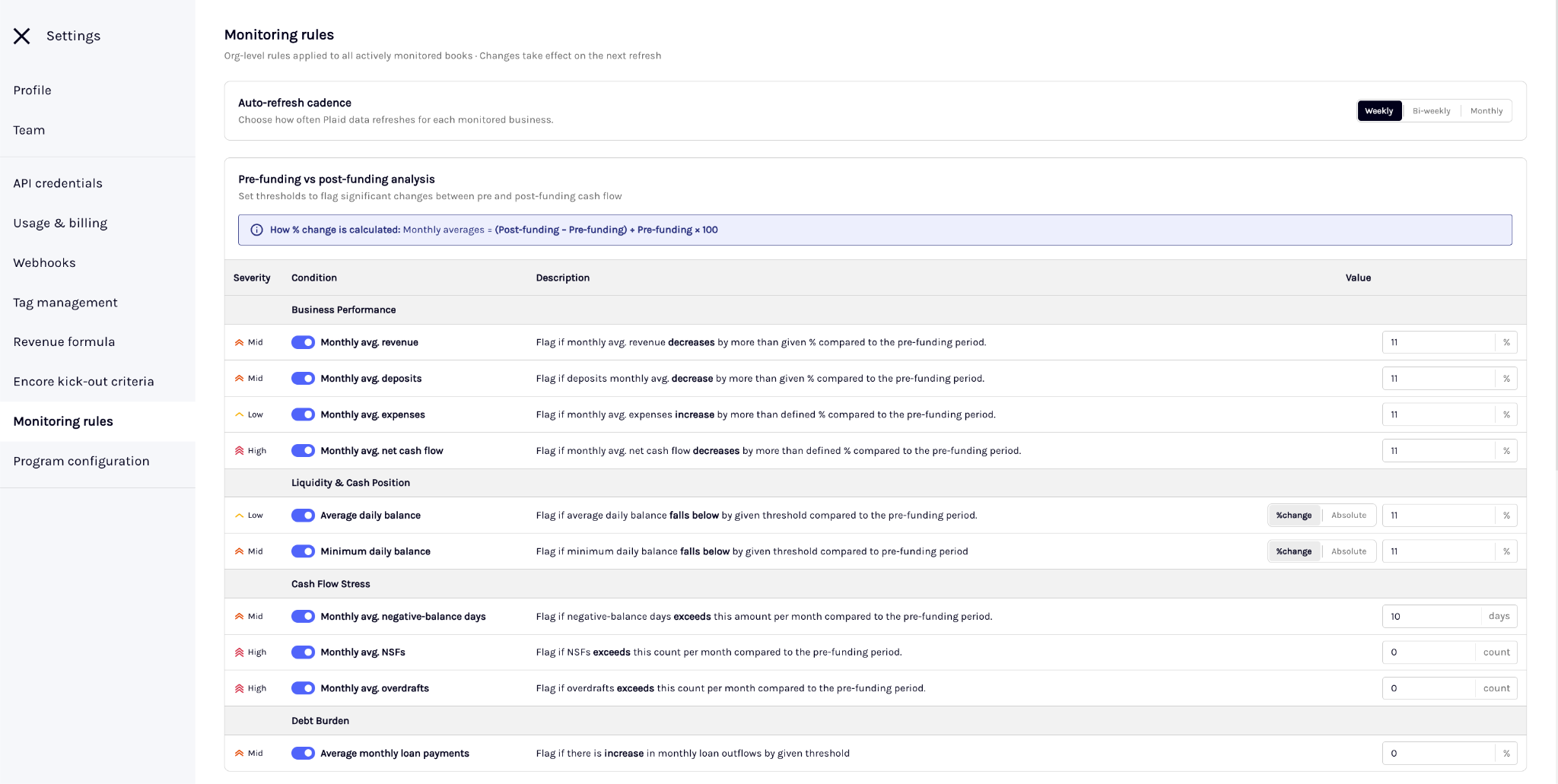
Log in to the Ocrolus Dashboard, and then select Settings > Monitoring rules.
-
Configure rules for the following two types of analysis:
Analysis type Description Settings you can configure for each available condition Pre-funding vs. post-funding analysis Identifies changes between the financial performance observed during underwriting and the business's performance after funding. - Enable or disable the condition.
- Configure the threshold that triggers the signal.
- Where supported, choose whether the threshold is evaluated as a percentage change or an absolute value.
Post-funding cash flow signals Evaluates recent post-funding financial activity without comparing it with the underwriting period. - Enable or disable the condition.
- Configure the threshold, where applicable.
- Select the lookback period used to evaluate the condition: 30, 60, or 90 days.
NoteSome conditions, such as new funding activity, don't require a numeric threshold. These conditions are evaluated based on whether the activity is detected.
-
Under Refresh settings, configure the refresh cadence for monitoring, where applicable. Automatic refreshes occur only if the Data source is set to automatic refresh.
-
Save your changes.
Step 5: Enable monitoring for a funded Book
Monitoring uses the rules configured for your organization. Before you enable monitoring for a business, make sure your monitoring rules are saved.
To start monitoring a funded business, perform the following steps:
-
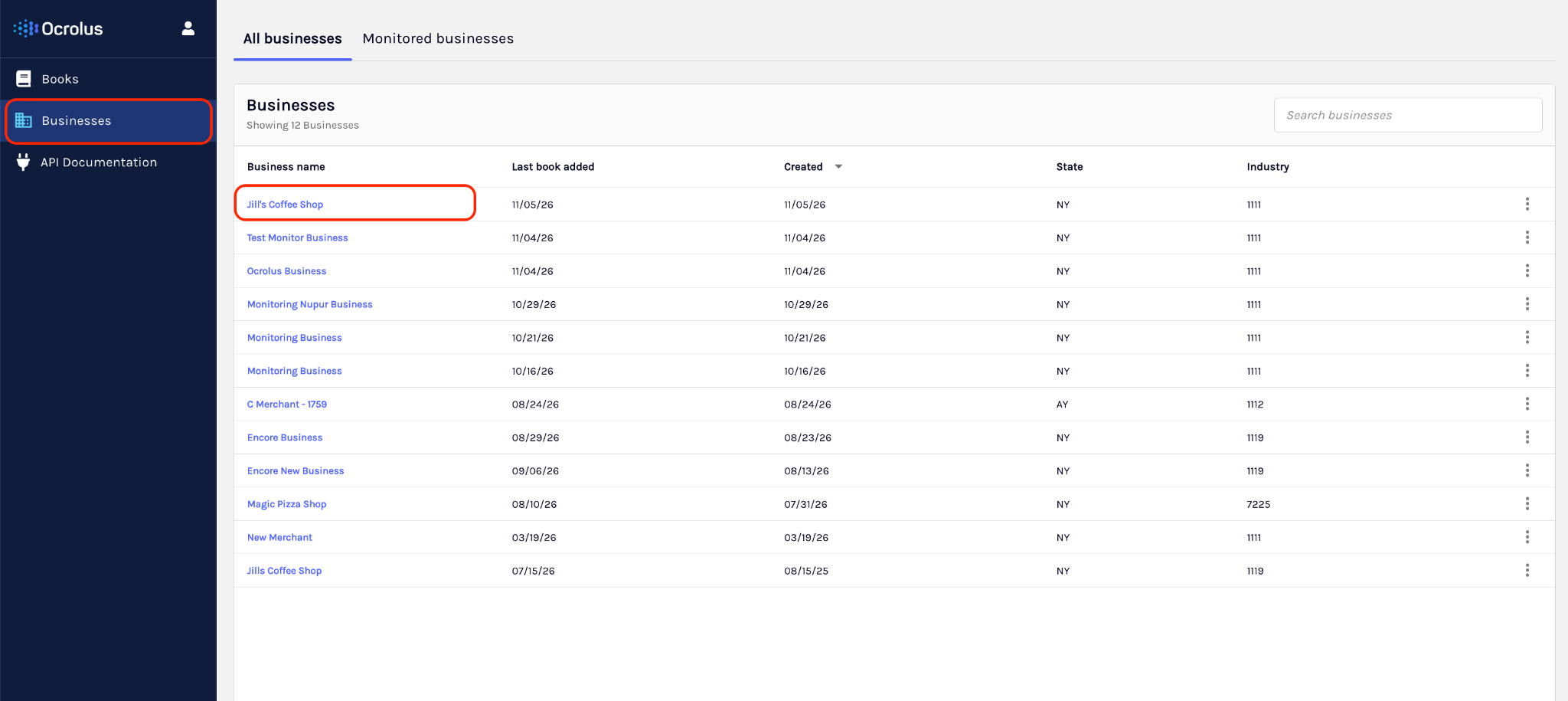
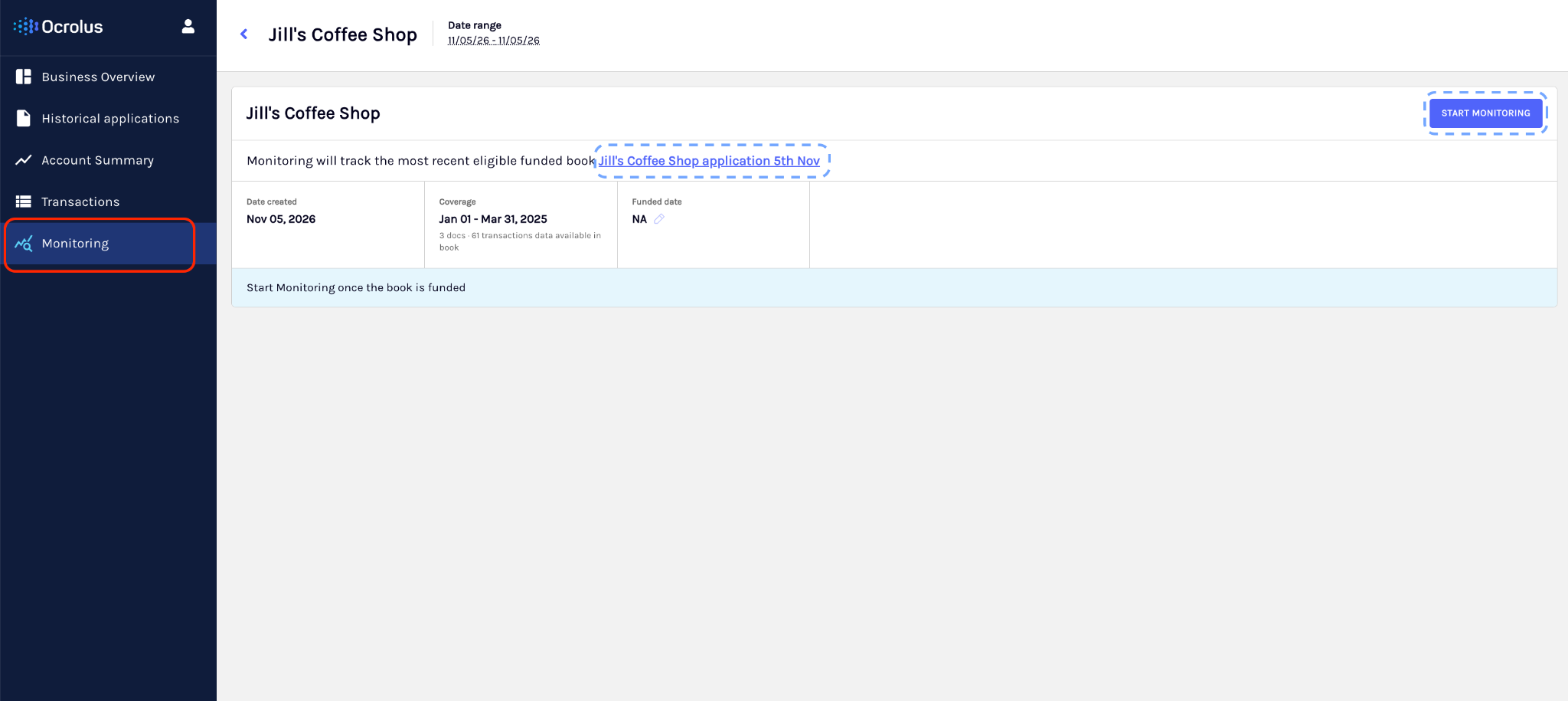
Enable monitoring for the funded Book through the Ocrolus Dashboard or the Enable monitoring API.
-
Provide the
funding_date. The funding date establishes the underwriting and monitoring periods used in signal evaluation.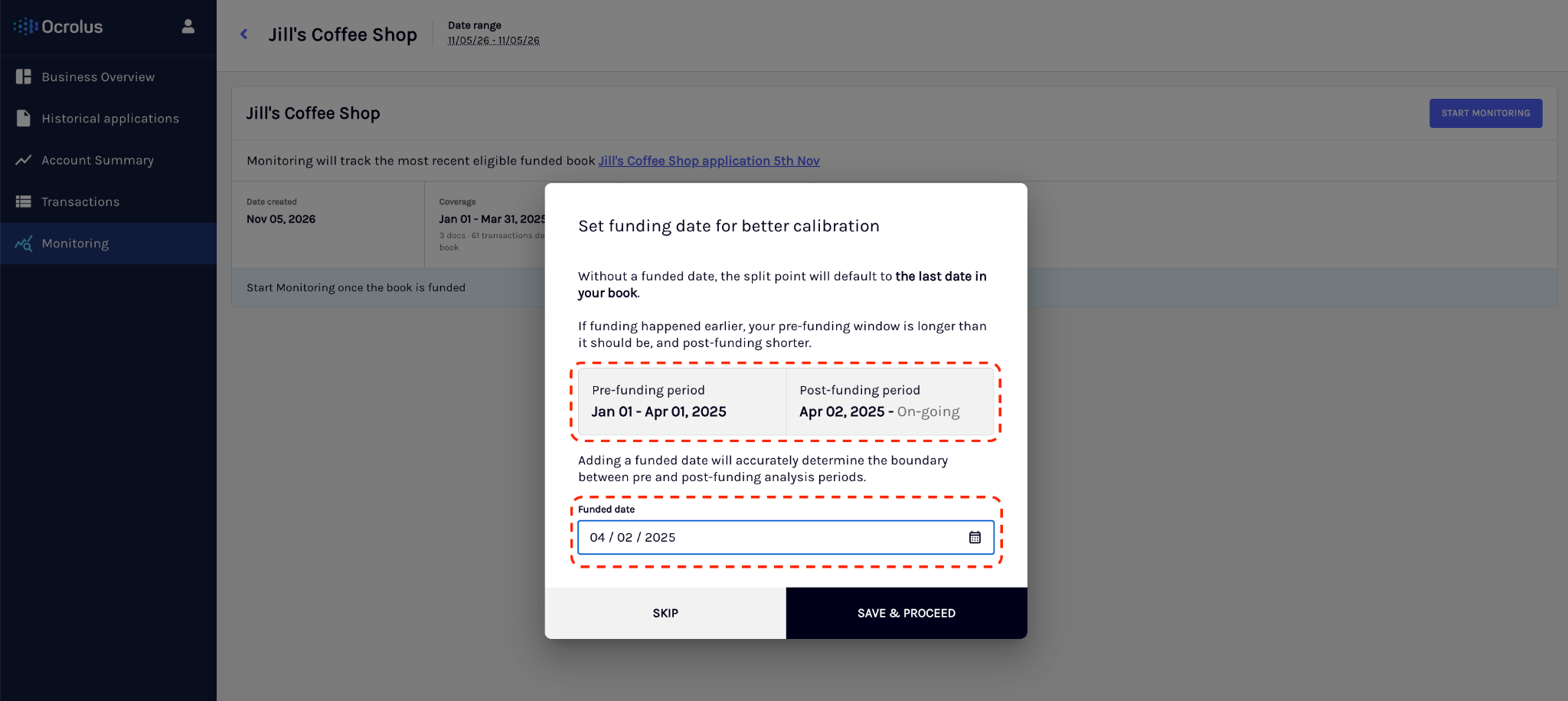
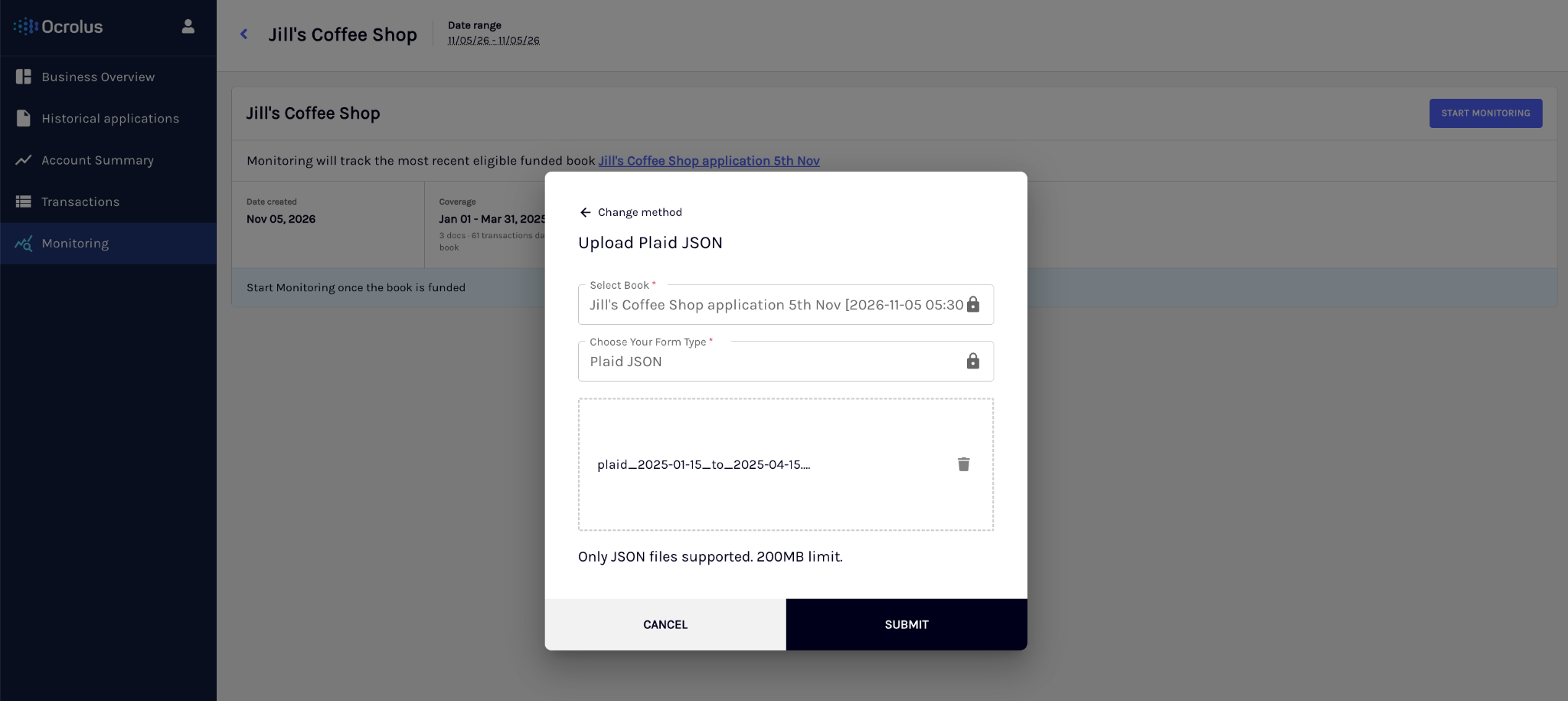
After you enable monitoring, the following events occur:
- The Book enters
PENDING_ACTIVATION. - If eligible post-underwriting Plaid data already exists on the Book, monitoring processing can begin using that data. If eligible data isn't available yet, the Book remains in
PENDING_ACTIVATIONuntil eligible Plaid data is successfully processed. - Monitoring becomes
ACTIVEonly after monitoring data is successfully processed. Monitoring billing begins when the Book becomesACTIVE.
Step 6: Review your monitored portfolio
To identify businesses that might need attention, perform the following steps:
-
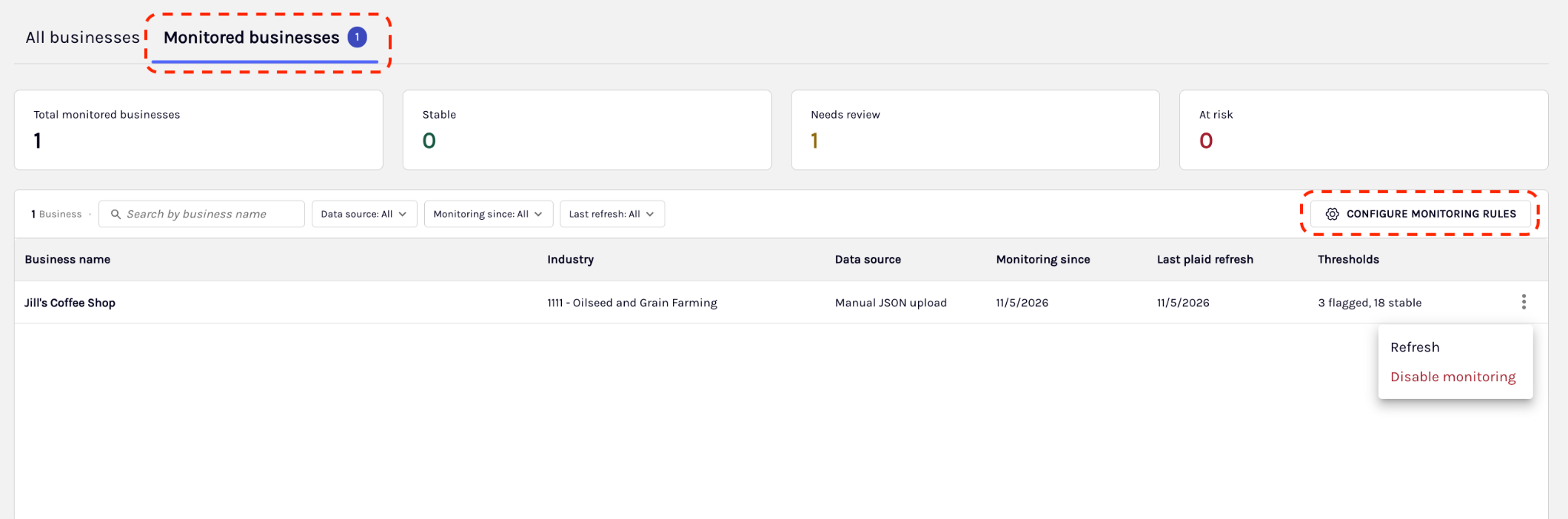
Open the Monitored Businesses view in the Dashboard, or use the Monitoring Report API.
-
Review the portfolio details. The portfolio view can include:
- Monitoring status.
- Overall business health status.
- Funding date.
- Monitoring data source.
- Latest successful refresh and data-through date.
- Number of triggered signals and highest signal severity.
- Triggered criteria.
The business-level health_status summarizes overall health and is separate from the severity of any individual signal. Monitoring can return business health values such as STABLE, NEEDS_REVIEW, and AT_RISK.
Step 7: Review monitoring signals
To understand why a monitored business was flagged, perform the following steps:
-
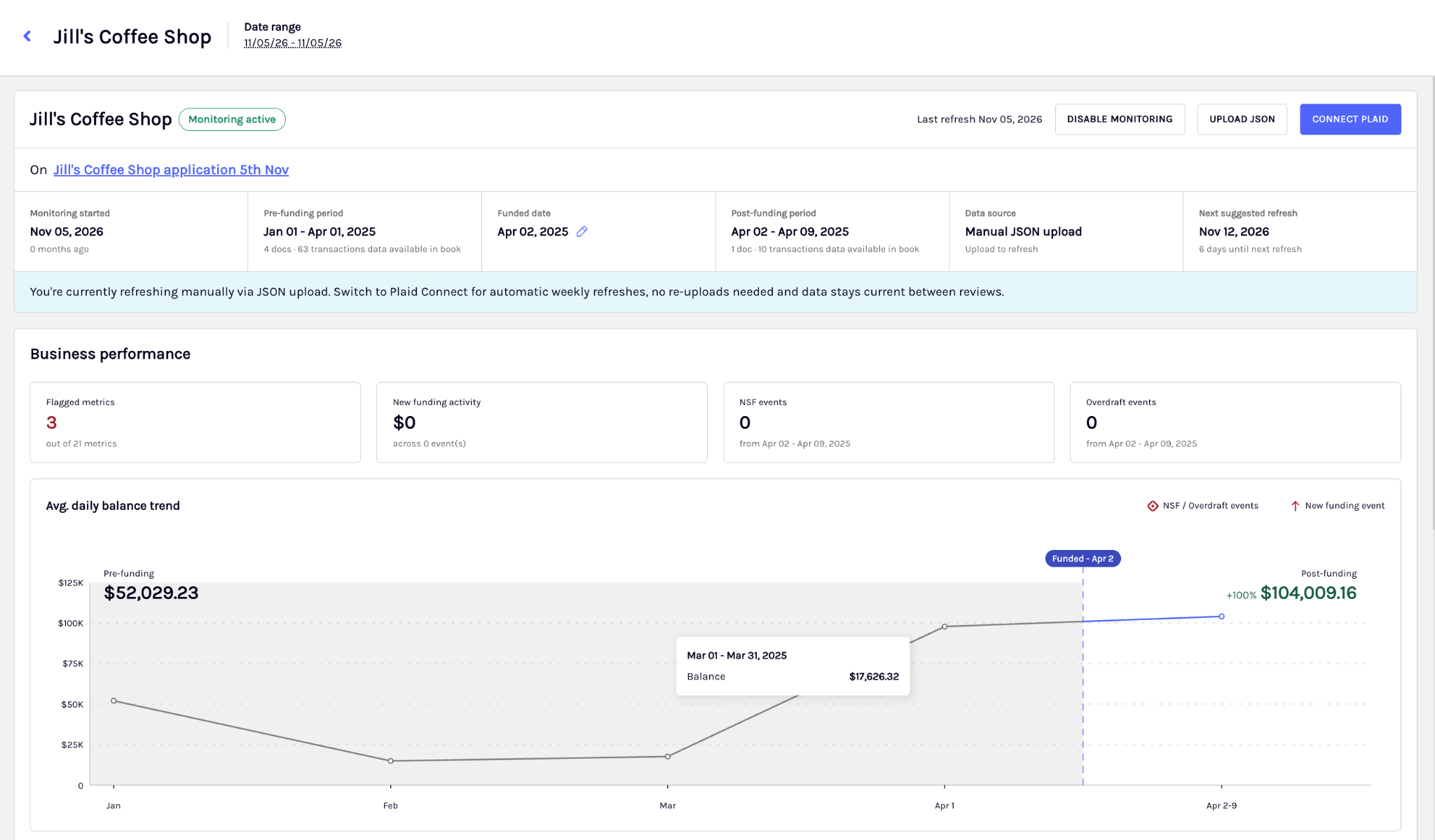
Open the Monitoring Signals view in the Dashboard, or use the Monitoring Signals API.
-
Review the details of each triggered signal. Each signal can include:
- The criterion that was triggered.
- The signal category and analysis type.
- The severity of the individual signal.
- The underlying financial metric used in the evaluation.
- The configured rule and threshold that produced the signal.
- The timestamps for when the signal was first triggered and most recently evaluated.
NoteOnly enabled monitoring rules are evaluated. If a rule is disabled or hasn't been configured for your organization, monitoring doesn't generate that signal.
Monitoring supports the following two signal analysis types:
| Analysis type | Description | Details it can return |
|---|---|---|
UNDERWRITING_COMPARISON | Compares post-funding performance with the underwriting baseline. | Underwriting and monitoring values, date ranges, absolute change, and percentage change. |
CURRENT_FINANCIAL_HEALTH | Evaluates a recent lookback period. | Current metric value, configured lookback, actual evaluated dates, and data-coverage status. |
Signal severity is returned for each individual signal and can be LOW, MEDIUM, or HIGH. This is distinct from the business-level health_status.
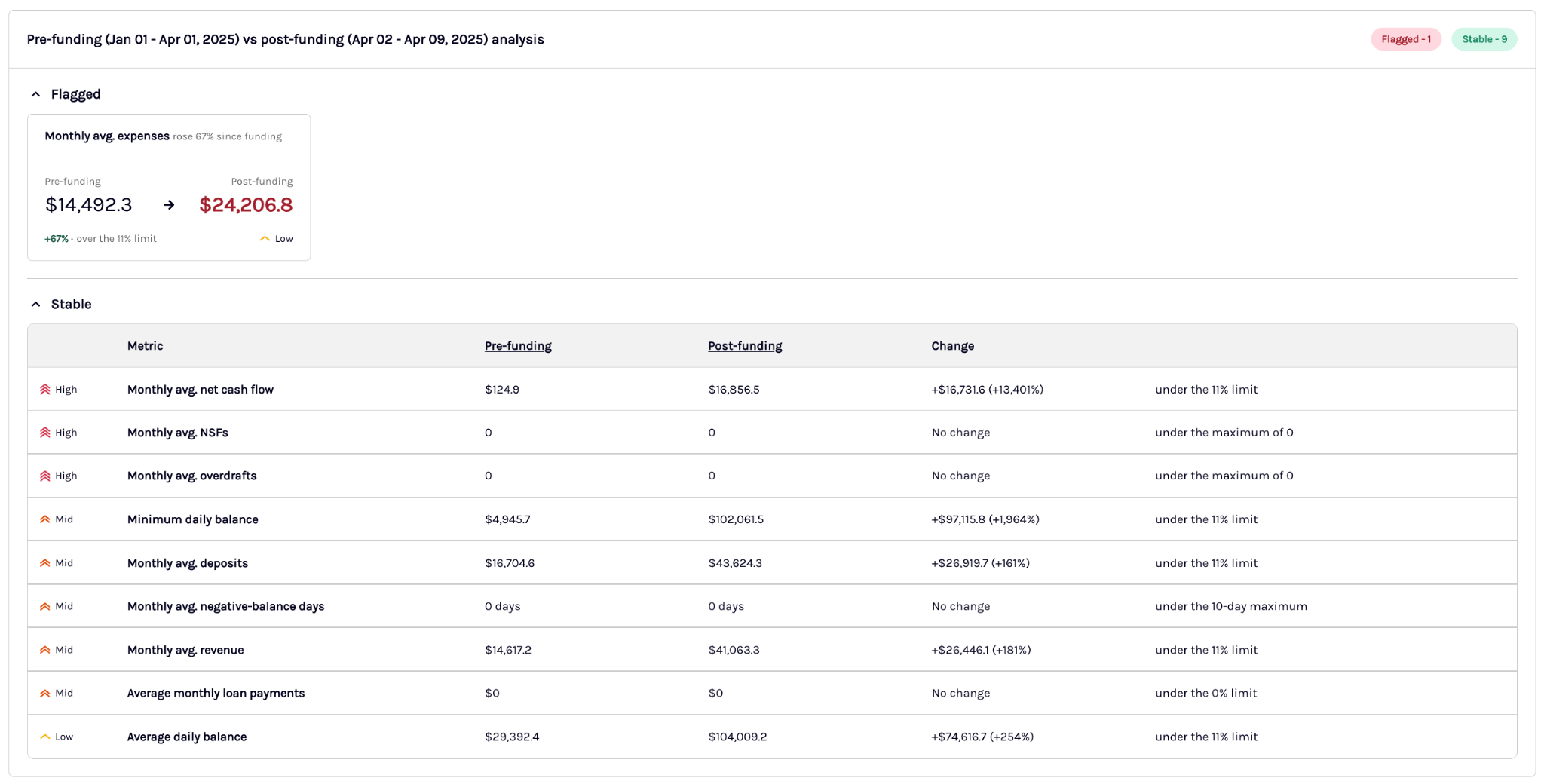
Underwriting comparison
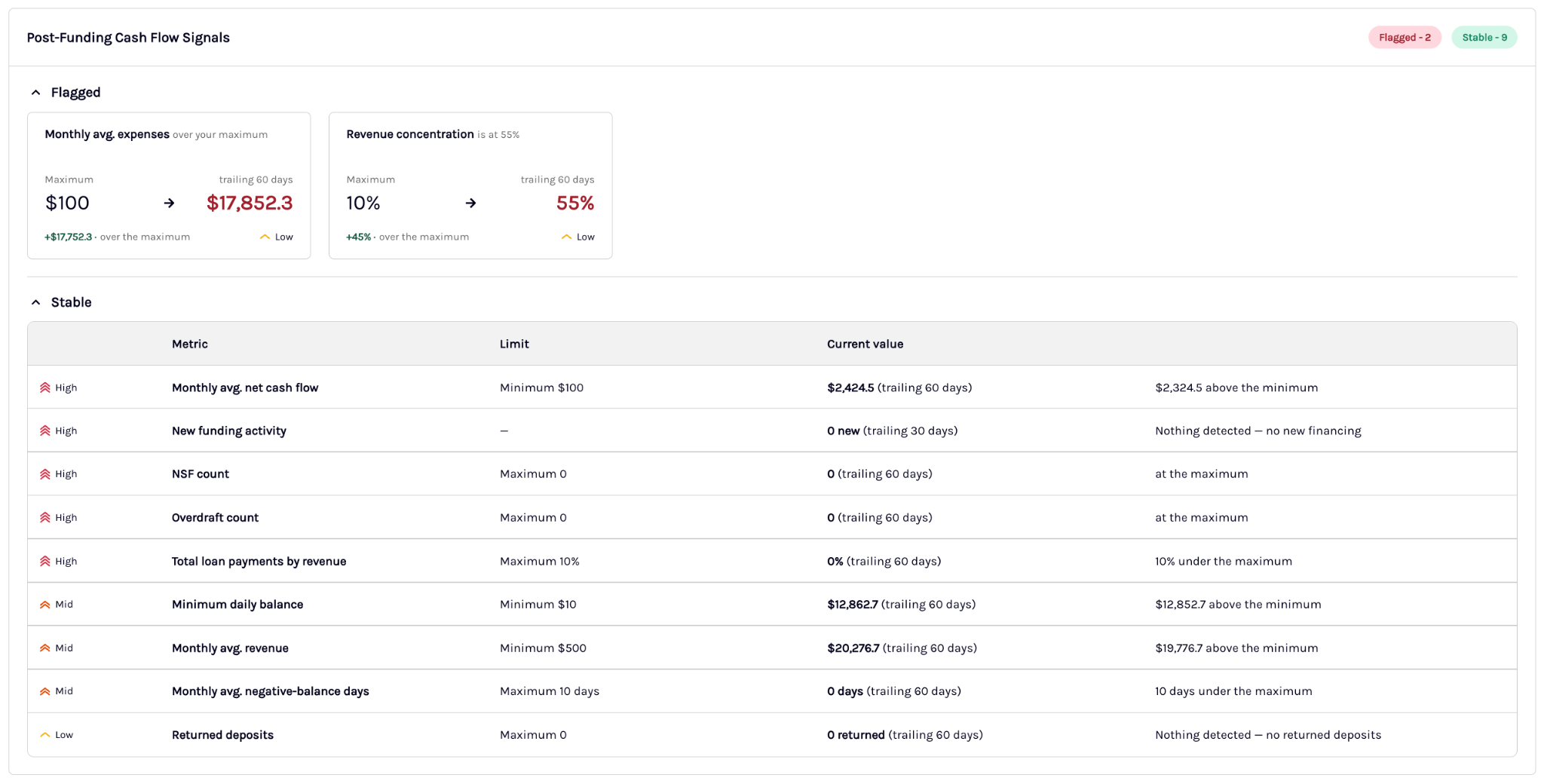
Current financial health
Step 8: Disable monitoring
When you no longer need monitoring for a Book, disable it through the Dashboard or the API.
After you disable monitoring:
- Future monitoring refreshes stop for the Book.
- Previously generated monitoring analytics, signals, and history are retained.
- Subsequent Plaid uploads can continue updating standard analytics but don't trigger monitoring processing while monitoring is disabled.
- The Book can be enabled for monitoring again according to the existing reactivation behavior.
Updated 7 days ago