
Detect
Ocrolus Detect is available directly within the Encompass embedded viewer. Underwriters can review document authenticity signals without leaving the loan file. Detect analyzes uploaded documents for signs
of tampering and manipulation and returns an Authenticity Score, reason codes, and bounding box visualizations for any flagged regions.
For a full overview of how Detect works, see the Detect product guide.
Accessing Detect in Encompass
To access Detect in Encompass:
-
Open a loan file in Encompass and select a document.
-
Switch to the DETECT tab in the document viewer.
-
Detect runs automatically. Once complete, the tab displays:
- Authenticity Score with pass/fail styling
- Reason codes explaining the signals that contributed to the score
- Signal counts per category such as Employer Address Edits, Employee Name Edits, and Editing Software Detected
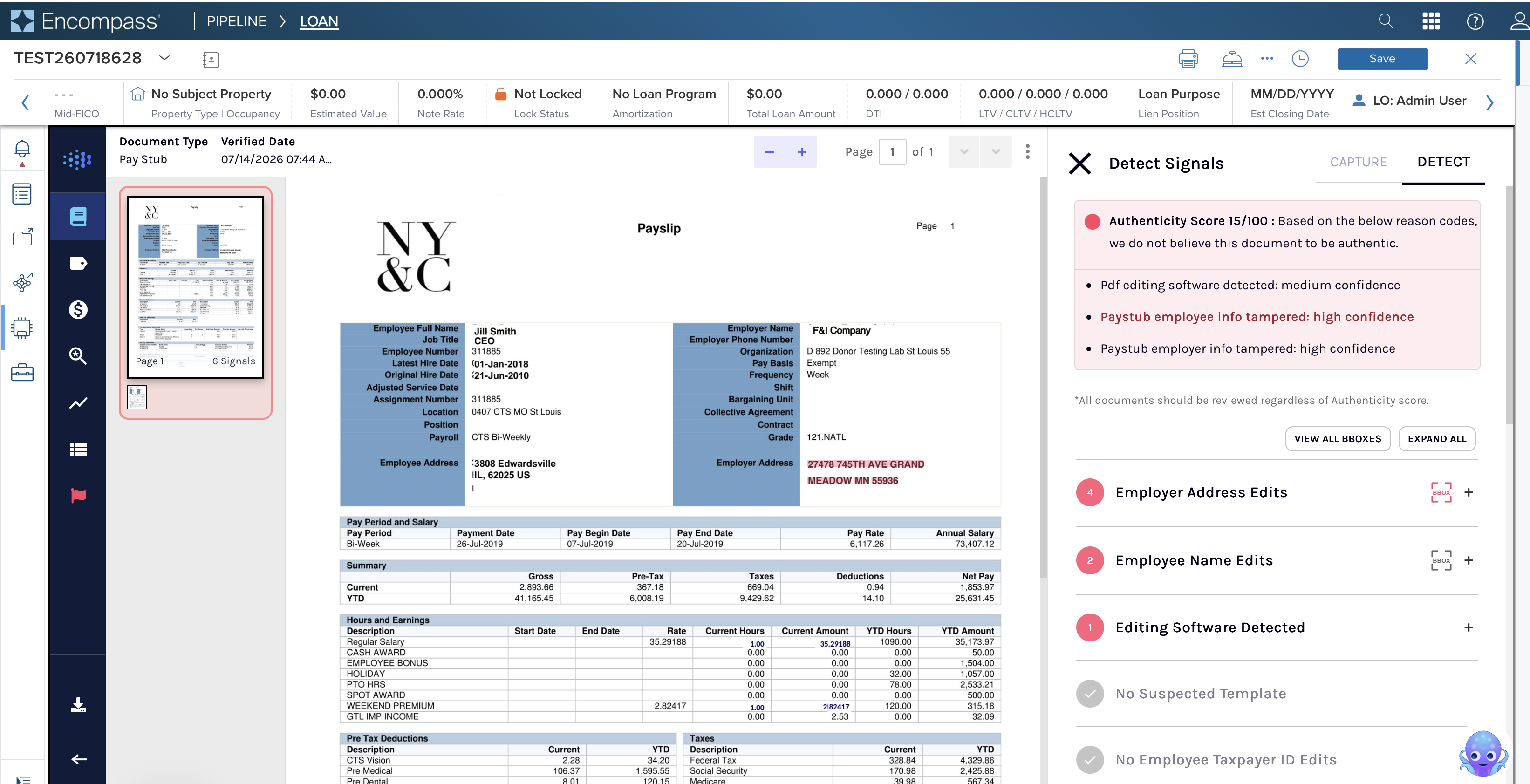
Bounding box visualizations
Each signal includes a bounding box toggle. Enabling the toggle highlights the specific region of the document where the signal was detected.
To view all bounding boxes at once, select Expand All or View All BBOXes. For multi-page documents, page navigation is available to move between flagged pages.
Signal consistency
Signals and Authenticity Scores shown in Encompass match what is reported on the Ocrolus Dashboard. You can cross-reference either surface for the same loan document without discrepancy.
Supported document types
Detect in Encompass supports bank statements, pay stubs, and W-2s. For documents with no detectable signals, the DETECT tab displays a clean result with no bounding boxes.
NoteWhile Ocrolus identifies potential signs of fraudulent activity, the final decision regarding fraud is yours to make. Some flagged documents may have legitimate explanations. For example:
- Documents with multiple names could belong to someone who recently changed their name or has variations in its spelling.
- Unusual image data might result from poor image conversion by the document's owner.
- Reports of uncommon fonts could be related to the design of the document itself.
We recommend manually reviewing any activity that Ocrolus flags as suspicious.
Updated 3 months ago