
August 2026
Release Notes
In this release, we've added Role-based access control (RBAC), industry-aware analytics and automatic business verification for SMB, Freddie Mac AIM Check integration and unified entity mapping for mortgage income review, a new BNPL transaction tag, BSIC PDF auto-export to the Encompass eFolder, improved loan-level grouping for 1003 (2020) and Lender Loan Information (2020), greyed-out income rows for unavailable self-employed data, a draggable document preview panel, grouped document deletion in the Index tab, Classify and Capture support for new document types and additional attributes, and the rename of Credit Shopping Events to Loan Inquiry Events.
What's new?
SMB
Industry-aware analytics
We've added industry-aware analytics to improve revenue accuracy by accounting for differences in how businesses across industries generate revenue. Lenders can now reduce manual adjustments and apply industry-specific revenue logic without changing revenue calculations across their entire portfolio. The key features include:
- Industry formulas screen: Access industry formulas from Industry formulas at the top of the revenue formula page, next to Primary formula in Ocrolus Dashboard.
- Add an industry formula: Apply a unique revenue formula to businesses in a given industry from Add new industry formula.
- Custom deduction tags: Build a formula from the categorized deduction tag panel such as Debt, Investing, NSF/Overdraft, Payroll, Tax, Transfer, Other, and Custom tag, with search and category filters.
- Draft state: Adding or removing a tag moves the formula into Draft, with a change counter and Save changes button until you save.
The following new API endpoints are available:
| Use case | Method | Endpoint |
|---|---|---|
| Create an industry revenue formula | POST | /v2/analytics/industry-revenue-formulas |
| Get a single industry revenue formula | GET | /v2/analytics/industry-revenue-formulas/{uuid} |
| List all industry revenue formulas in your organization | GET | /v2/analytics/industry-revenue-formulas |
| List Ocrolus-suggested revenue formulas | GET | /v2/analytics/industry-revenue-formulas/suggestions |
| Update an industry revenue formula | PUT | /v2/analytics/industry-revenue-formulas/{uuid} |
| Delete an industry revenue formula | DELETE | /v2/analytics/industry-revenue-formulas/{uuid} |
Industry revenue formulas are also available through the API to let you manage formulas programmatically. Creating, updating, and deleting a formula requires the manager role. Revenue formulas will be applied to all the existing and new Books. To learn more, see the Industry-aware formulas guide and API documentation .
Dashboard
Role-based access control
Lending Operations Managers can now assign one of six pre-built personas to each Dashboard user so that capabilities in Analyze, Inspect, and Encompass import are gated by job function. Each user can view and act on only what their role requires.
The six personas are Loan Officer, Processor, Underwriter, LO / Processing Asst., Closer / Funder, and Lending Ops Manager. Roles are assigned in Organization Settings > Team, which upgrades to a merged Web Users table combining Ocrolus accounts, LOS accounts, and pending invitations. Duplicate-email conflicts between Encompass users and existing Ocrolus accounts are surfaced in the Team table with a guided resolution flow.
System Roles is enabled per organization. Contact your Ocrolus account manager to request enablement. For setup instructions and a full capability matrix, see the Role-based access control and Assign system roles guide page.
Analyze for Mortgage
Unified entity mapping in the Review Suggested Matches (RSM) modal
You can now map all loan entities in a single step before reviewing income. This update is available to all mortgage clients, including Encompass-integrated and non-Encompass users.
The RSM modal now includes a Step 2 that covers employers, addresses, other income sources, and assets in one scrollable pane. Mappings you confirm here apply across all income tabs and carry through to the Import Income screen automatically, so you do not need to re-specify them at import time.
The Import Income screen is also updated. Instead of selecting borrower and employer mappings from dropdowns, you now review a read-only four-column summary of your Ocrolus entity, loan application entry, existing income, and new income, then confirm or go back.
For more information, see the Unified entity mapping section of the guide.
Freddie Mac AIM Check integration
Ocrolus now integrates directly with Freddie Mac's Asset and Income Modeler (AIM) Check for Payroll Income. Lenders can obtain automated income representation-and-warranty (R&W) relief on wage-earner borrowers using the pay stubs and W-2s they've already uploaded to Ocrolus, with no re-keying and no separate income-verification vendor.
What it does
- Reuses the pay stubs and W-2s already classified and extracted in Ocrolus, no new uploads required.
- Transforms the extracted income data into Freddie Mac's MISMO-format AIM Check request.
- Submits to Freddie Mac's AIM Check API and returns the assessment result, per-income-type eligibility, and the Freddie Mac certificate.
- Surfaces the result in the new Freddie Mac income panel in the Ocrolus Dashboard, and lets you import the certificate and income data into Encompass.
The supported income types are Base, Bonus, Commission, and Overtime for wage-earner (pre-close) borrowers with pay stubs and W-2s.
To get started, register with Freddie Mac, add Ocrolus as your AIM service provider, and provide your Seller/Servicer number to Ocrolus. For full setup steps, see the Freddie Mac AIM Check setup guide. For a complete reference, see the Freddie Mac AIM Check integration guide.
NoteFreddie Mac AIM Check is opt-in and enabled per organization by Ocrolus once your Seller/Servicer number is on file. No API changes are required for existing customers, and no action is needed unless you choose to enable the integration.
SMB
Buy Now Pay Later (BNPL) transaction tag
We're introducing a new BNPL transaction tag within SMB transaction tagging. Unlike traditional loan transactions, Buy Now Pay Later activity represents a distinct category of financial data. Transactions associated with common BNPL providers will now be classified under a dedicated BNPL tag.
Introducing a dedicated BNPL tag improves transaction categorization and provides clearer visibility into merchant cash flows. It also lays the foundation for future enhancements to Ocrolus' transaction tagging capabilities.
Beginning with this release:
- Transactions matching supported BNPL providers will be assigned the BNPL tag.
- Existing transaction tags and analytics behavior remain unchanged for all other transaction types.
- No customer configuration or action is required.
Impact
You may notice a new BNPL tag appearing in transaction outputs for merchants that use Buy Now Pay Later providers. This is an additive enhancement intended to improve transaction classification. Existing integrations remain fully backward compatible.
If you have any questions about this update, please reach out to your Account manager or Ocrolus Support.
Automatic business verification
Ocrolus now automatically verifies business entities when a Book is uploaded, no configuration required. Verified data includes formation status, registered names, addresses, associated people, and industry classification. It is available through the Business overview and Book summary endpoints and the dashboard.
This release includes the following updates:
- Automatic verification: When a Book is processed, Ocrolus verifies business information with a third-party provider. Existing API integrations continue to work, enriched data appears in the same endpoints you already use.
- Reliable entity matching: Books are now linked to businesses using verified identity data, replacing name-and-address similarity matching. This ensures a borrower's full history is accurately captured across Books.
- Three new fields in Business Overview and Book Summary: Names (all known business names, including DBAs), website (business website information), and people (people associated with the business). Your existing overrides such as NAICS codes or other business attributes are preserved.
This helps underwriters confirm that a borrower’s business is real, helps fraud investigators verify entity authenticity, and supports any team that relies on accurate business-level data across multiple Books.
Note
- Your overrides are preserved. If you override a NAICS code or other business attribute, automatic business verification does not change it.
- No integration changes required. Verification is automatic. Existing API integrations continue to work and enriched data appears in the same endpoints you already use.
API response changes
A new top-level field, business_verification_data, is added to the 200 response at the same level as id, name, and state.
"business_verification_data": {
    "legal_name": "Acme Corporation LLC",
    "formation_type": "Limited Liability Company",
    "names": [
        "Acme Corp",
        "Acme Co.",
        "Acme Holdings"
    ],
    "website": {
        "url": "https://www.acmecorporation.com",
        "status": "active"
    },
    "people": [
        {
            "name": "Alberta Bobbeth",
            "title": "CEO"
        },
        {
            "name": "Charleston Daniel",
            "title": "OWNER"
        }
    ],
}"business_verification_data": {
"legal_name": "Acme Corporation LLC",
"address": [
{
"address_line_1": "123 OCRO WORLD IN",
"address_line_2": "STREET 2",
"city": "LOS ANGELES",
"state": "NY",
"zip": "10005"
}
],
"formation_type": "Limited Liability Company",
"names": [
"Acme Corp",
"Acme Co.",
"Acme Holdings"
],
"website": {
"url": "https://www.acmecorporation.com",
"status": "active"
},
"people": [
{
"name": "Alberta Bobbeth",
"title": "CEO"
},
{
"name": "Charleston Daniel",
"title": "OWNER"
}
],
}Classify and Capture
New Classify and Capture supported document
The Classify and Capture supports are enabled for the following newly onboarded document:
Classify-only
New Classify supported document
The Classify supports are enabled for the following newly onboarded documents:
| Category | Document |
|---|---|
| Closing |
|
| Disclosure |
|
| Identification |
|
| Mortgage-specific forms |
|
| Property |
|
To learn more, see the All Supported Documents page.
Enhancements
Analyze for Mortgage
Greyed-out income rows for unavailable data
Self-employed income rows in the Analyze dashboard are now greyed out when Ocrolus cannot collect a usable value from the uploaded documents, rather than displaying a blank or zero. This applies when required document pages are missing, extracted values are ambiguous, or a field is not applicable to the borrower's business structure. Greyed-out rows are read-only, re-uploading the relevant pages and reprocessing the Book restores them to an editable state. In the API response, these fields return null (not 0). For more information, see the Self-employed income section.
Draggable document preview panel
The document preview panel in Analyze is now draggable. Click and drag the panel header to reposition it anywhere on the screen. This helps you to view income fields and the source document side by side. The panel returns to its default position on page navigation. This improvement applies across all income types in the Analyze mortgage dashboard.
Grouped document deletion in the Index tab
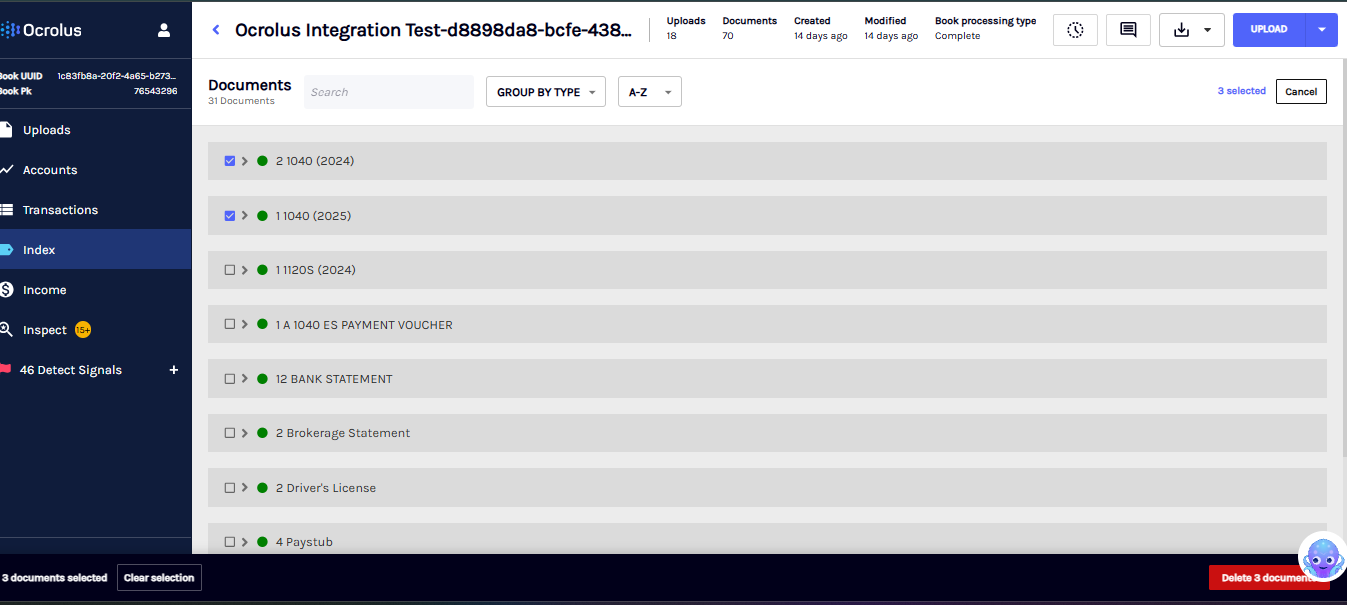
When the isFormGroupingEnabled flag is enabled, related documents that belong to the same group appear as a single entry in the Index tab. Deleting a grouped entry now removes all document records belonging to that group.
NoteThis fix applies to document-level deletion only. Selectively removing individual pages or documents from within a grouped entry is not yet supported. For more information, see Deleting a grouped document.
Encompass - Classify
BSIC PDF auto-export to the Encompass eFolder
The Bank Statement Income Calculation PDF can now be automatically exported to the Encompass eFolder upon BSIC completion, matching the existing behavior for the Analyze Income Worksheet. When processing is complete, Ocrolus creates a Bank Statement Income Calculation folder in the eFolder and places the PDF there without any manual intervention.
This behavior is opt-in. To enable it:
- The
isAutoExportBSICPDFEnabledflag should be set totruefor your organization. - Optionally, configure a custom folder name using the eFolder Mapping tool.
For more information, see the Automatic PDF export to Encompass
Improved loan-level grouping for 1003 (2020) and Lender Loan Information (2020)
Ocrolus now automatically groups a 1003 (2020) Uniform Residential Loan Application and its accompanying Lender Loan Information (2020) addendum as part of the same loan file, using shared uniqueness value fields including loan identifiers, borrower name, and subject property address.
Now, when a loan file contains an initial disclosure and a final closing 1003, Ocrolus uses the borrower signature date to distinguish them as separate versions rather than treating them as duplicates.
For more information, see the Loan application form grouping.
SMB
Credit Shopping Events renamed to Loan Inquiry Events
The term Credit Shopping Events has been renamed to Loan Inquiry Events across all Ocrolus documentation to better align with how lenders describe this activity. This is a documentation-only change. No API behavior, endpoint names, response fields, or schema have changed, and existing integrations require no updates. To learn more, see the Loan Inquiry Events guide and API documentation.
Classify and Capture
Additional attribute support
Ocrolus now offers support for the following attribute within the existing document type:
| Form | New fields |
|---|---|
| Brokerage Statement |
|
| VA Certificate of Eligibility |
|
| Closing Protection Letter |
|
| 4562 - Depreciation and Amortization |
|
| Homeowner Insurance Policy - Insurance Binder |
|
| Loan Product Advisor (LPA) Feedback Certificate |
|
| IRS Form 1040 Schedule C (2023) - Profit or Loss From Business |
|
| 1040 Schedule C (2024) - Profit or Loss from Business |
|
| 1040 Schedule C (2025) - Profit or Loss from Business |
|