
February 2026
Release Notes
In this release, we added support for Finicity JSON ingestion and enhanced Encore automated cash flow kick-outs for incoming Books. We introduced improvements to Analyze income calculations, including Schedule C business mileage fallback (Form 4562), Form 8825 depreciation automation, Form 1125-E support, and OPM Annuity Statement inclusion for Other Income, and extended the Fannie Mae income calculator integration to support rental income. We also enhanced transaction capture by adding a new account_source field to the bank_accounts object in the Transactions API and expanded Classify and Classify + Capture document support.
What's new?
SMB
Finicity JSON ingestion support
Ocrolus now supports uploading and processing Finicity JSON data through the existing JSON upload endpoint, providing full parity with Plaid ingestion workflows. Clients can upload Finicity JSON bundles containing accounts, transactions, customers, and institutions, which are automatically normalized into Ocrolus’ standardized transaction schema.
Finicity transactions now trigger the same reconciliation, enrichment, mismatch detection, and analytics pipelines as Plaid, ensuring consistent analytics and coverage across aggregators. This update removes the need for manual data conversion or workarounds and enables seamless multi-aggregator support without impacting existing Plaid workflows or APIs.
To learn more, see the Upload Aggregator JSON API documentation and Finicity aggregator guide.
Enhancements
SMB
Encore - automated cash flow kick-outs for incoming Books
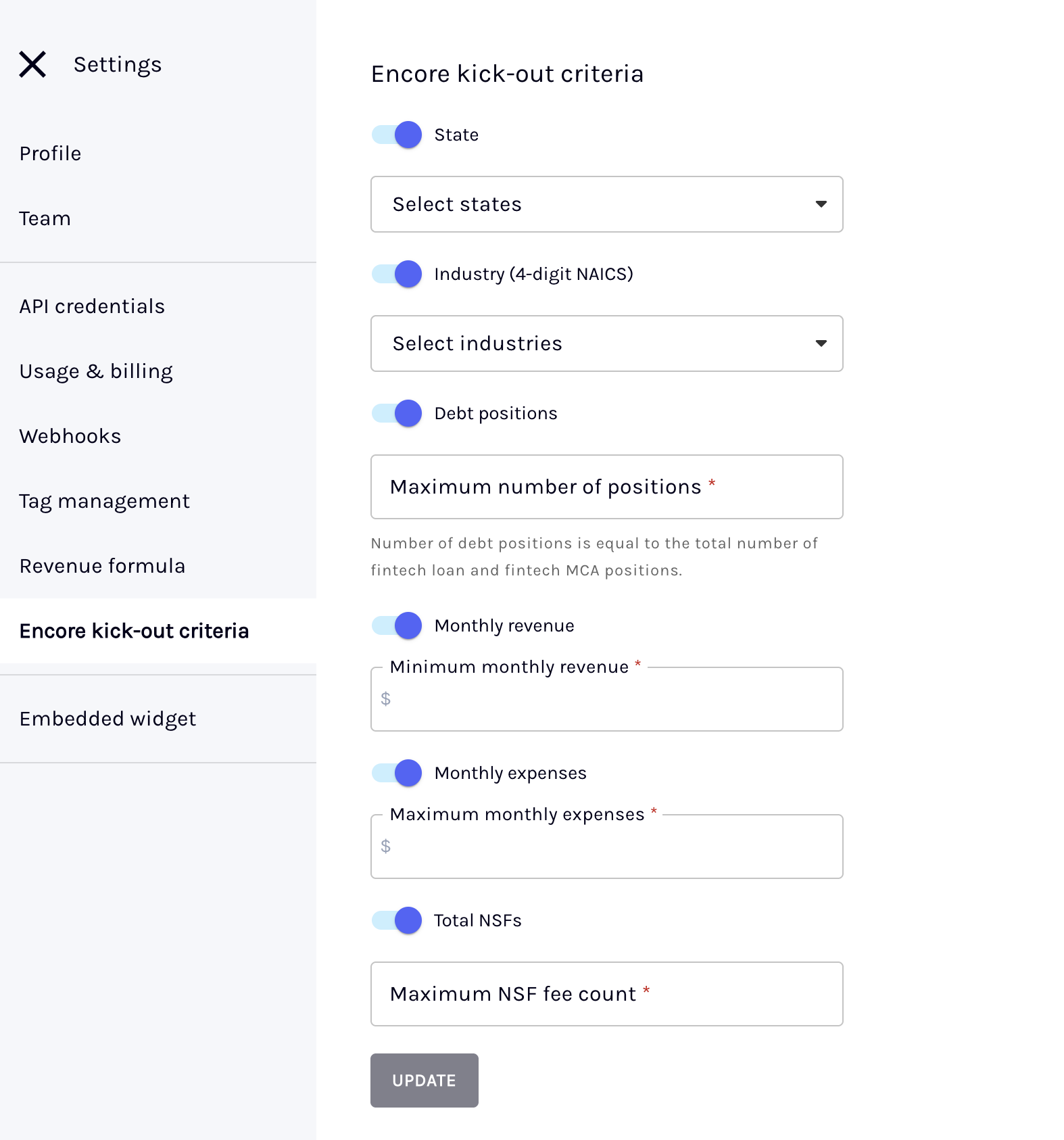
As part of ongoing enhancements to the Encore recipient workflow, we've introduced automated cash flow kick-outs to enable recipient organizations automatically accept or reject incoming shared Books based on funder-defined cash flow criteria. Recipients can define and manage kick-out rules using key fields such as industry, state, revenue, expenses, fintech debt count and NSFs, allowing incoming Books to be evaluated automatically at scale.
NoteThis feature is optional and not required to get started with Encore.
While optional, automated cash flow kick-outs can be triggered in two following ways:
- API [POST]
/v1/book/copy-jobs/run-kickouts: Send a POST request to signal readiness to run kick-outs, enabling programmatic automation for high-volume lenders. To learn more, see the Run automated cash flow kick-outs API documentation. - Dashboard: Admins can bulk-select incoming Books and click Encore kick-out criteria to trigger evaluation directly from the interface.
Automated kick-outs can reduce underwriting review time, streamlines time-to-decision, and enables intake volume to scale without adding headcount. To learn more, see the Receiver's guide for dashboard users and Receiver's guide for API users.
Mortgage
Analyze income calculation
We’ve made the following enhancements to reduce manual review and improve calculation accuracy in Analyze:
Self-employed income
-
Schedule C business mileage fallback (Form 4562): Ocrolus Analyze now uses Form 4562 as a fallback source for business mileage when Schedule C Page 2, Part IV, Line 44a is missing, blank, or reported as zero. This improves mileage capture and increases the reliability of Schedule C income calculations. To learn more, see the Self-employed income page.
-
Form 8825 depreciation automation: Ocrolus Analyze now automatically uses depreciation values captured from Form 8825 for all business types, eliminating the need for manual verification and improving consistency in self-employed income calculations. To learn more, see the Self-employed income page.
-
Form 1125-E support (Compensation of Officers): Ocrolus Analyze now supports Form 1125-E when calculating self-employed income for Forms 1120-S, 1065, and 1120. Officer compensation is now correctly included as W-2 income where applicable. To learn more, see the Self-employed income page.
Other income
- OPM Annuity Statement support for Other Income: Ocrolus Analyze now includes income captured from Office of Personnel Management (OPM) Annuity Statements in pension (Other Income) calculations to improve automation and reduce the need for manual lender review. To learn more, see the Other income page.
Fannie Mae rental income calculator integration
In addition to self-employed income type, we have extended support to the rep-and-warranty-backed rental income calculations through the Fannie Mae income calculator. This integration automatically extracts rental income data from IRS Schedule E (Form 1040), submits it to Fannie Mae, and returns GSE-backed qualifying income results directly in Analyze.
Fannie Mae rental income support is in beta!This section discusses functionality that is in beta. You may occasionally experience unannounced changes or bugs. We'd greatly appreciate your feedback on this feature and its accompanying documentation.
Key highlights
- Automated Schedule E extraction: Extracts rental income, expenses, fair rental days, and depreciation by property and tax year.
- Validated submission to Fannie Mae: Ensures required fields are complete before sending data to the calculator.
- Fannie Mae Recommended income display: Shows calculated rental income in Analyze with inline alerts for transparency.
- Multi-year support: Applies appropriate averaging or year-selection logic based on guideline requirements.
- Override and rerun controls: Warns users when overriding income and allows resubmission while maintaining the same Case File ID.
- Export to Encompass: Pushes calculated income and Case File ID directly into Encompass for auditability.
To learn more, see the Fannie Mae income calculator guide.
Classify
New Classify supported document
The Classify supports are enabled for the following newly onboarded document:
Disclosure
- Disclosure Statement - Controlled Business Arrangement
To learn more, see the All Supported Documents page.
Capture
Source account detail from bank statement
The Transactions endpoint now includes a new account_source field within the bank_accounts object. It allows you to determine whether account data was sourced from traditional bank statements, transaction summaries, credit unions, or VOA providers such as Plaid, Finicity, Blend, or AccountChek.This field identifies the origin of the bank account data.
Supported values: STANDARD_STATEMENT, TRANSACTION_SUMMARY, CREDIT_UNION, VOA_PLAID, VOA_BLEND, VOA_FINICITY, VOA_ACCOUNTCHEK, VOA_OTHERS, OTHERS
The default value is null.
To learn more, see the Transactions API.
Classify and Capture
Additional attribute support
Ocrolus now offers support for the following attribute within the existing document type:
mortgage_statement-Part2-AccountInfo:defferedBalancemortgage_statement-Part2-AccountInfo:adjustableRateMortgageArmIndicatormortgage_statement-Part4-PriorPayment:transactionHistoryPaymentReversalIndicator
homeowner_insurance_policy-Part1-PolicyHolderInformation:agentNamehomeowner_insurance_policy-Part1-PolicyHolderInformation:agentPhoneNumberhomeowner_insurance_policy-Part2-PolicyInformation:extendedDwellingCoverageAmounthomeowner_insurance_policy-Part2-PolicyInformation:extendedDwellingCoveragePercentagehomeowner_insurance_policy-Part2-PolicyInformation:policyTypehomeowner_insurance_policy-Part2-PolicyInformation:propertyTypehomeowner_insurance_policy-Part2-PolicyInformation:occupancy
To learn more, see the All supported documents page.